A segmented control of 2, 3 or 4 segments, where the selected segment is filled brand-blue and the others carry a brand-blue outline.
numberOfTabs gives 2, 3 or 4 text segments by design, each filling the width evenly, built from Segmented Control Button instances with every value token-bound.How the segmented control appears in a real product screen — a two-tab control choosing between Repeat and Schedule Once on Autoload.
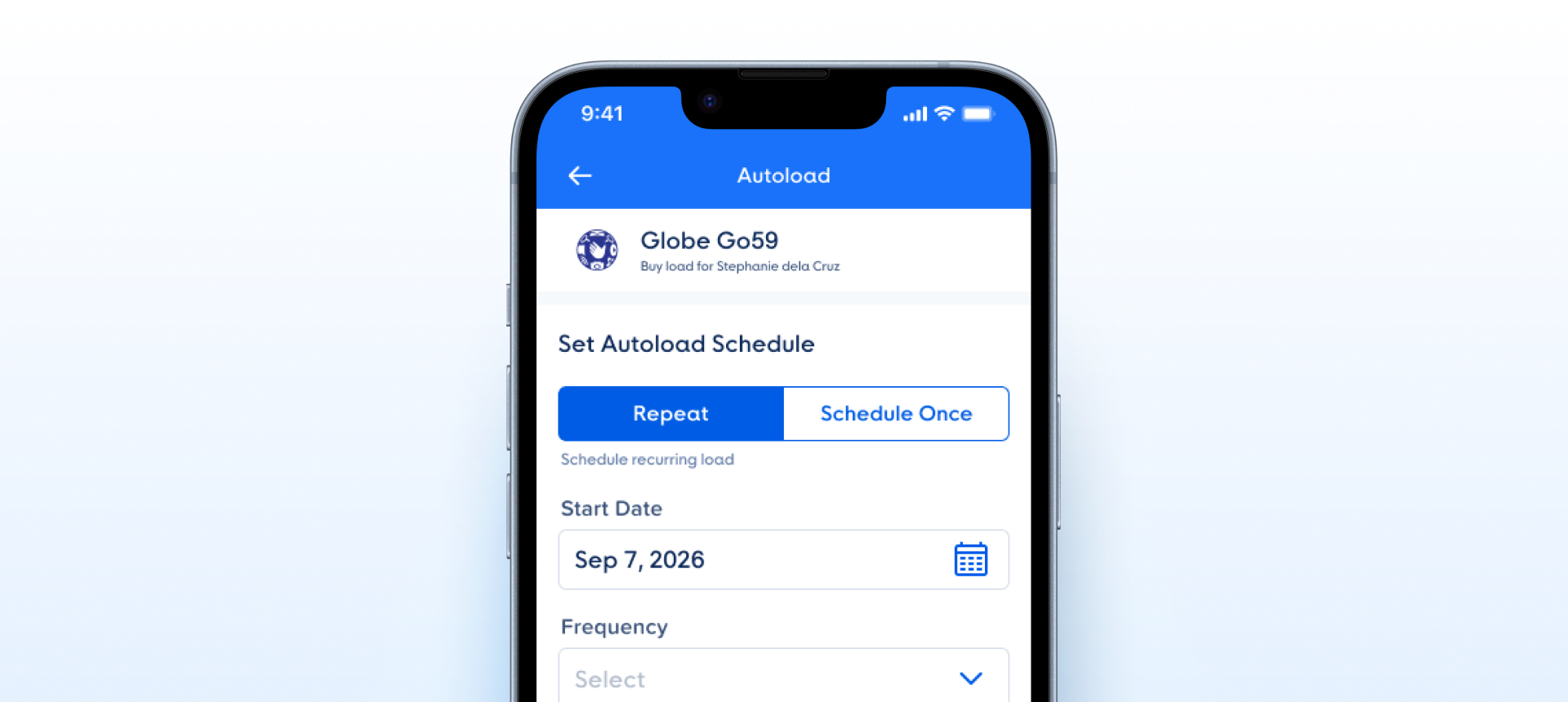
numberOfTabs covers 2, 3 and 4 segments, so one component serves every common count.numberOfTabs is a clear, non-positional property. Which segment is active and what each says are set on the segment instances — isActive and the label text.| State | iOS | Android | Figma Property | Notes |
|---|---|---|---|---|
| Tap unselected segment | Yes | Yes | Switches selectedIndex | Pressed state on the tapped segment isn't modeled — should preview the destination on touch-down, commit on touch-up. |
| Tap selected segment | N/A | N/A | No-op | Re-tapping the selected segment should be a no-op (or, optionally, reset to a default). Not spec'd. |
| Pressed | Yes | Yes | Segment <code>State=Pressed</code> | Each Segmented Control Button carries a Pressed state for the touch-down. |
| Focused (keyboard / a11y) | N/A | N/A | Drawn by the platform | No Focused variant by design — on touch screens the system draws accessibility focus. |
| Disabled | Yes | Yes | Segment <code>State=Disabled</code> | Each Segmented Control Button carries a Disabled state. |
- Component locks 2 segments via positional variants:
numberOfTabsnow offers 2, 3 and 4 segments — checked on node 26628:50765 (C1) - Positional naming in the selection axis: the
selected=first|secondaxis is gone; each segment carries its ownisActive— checked on node 26628:50765 (C2) - Equal-width 168 segments are hardcoded: segments are set to Fill and share the width evenly — checked on node 26628:50765 (C1)
- No Focused state: withdrawn — Segmented Control Button ships Default, Pressed and Disabled by design; on touch screens focus is drawn by the system, so no Focused variant is needed — owner decision, 6 Oct 2026, node 26628:50752 (C5)
- Segment label is baked text: withdrawn — the label is set by overriding the text on the segment instance, which Figma allows without a property; owner decision, 6 Oct 2026, node 26628:50752 (C4)
- No icon or count slot in a segment: withdrawn — segments are text-only by design; owner decision, 6 Oct 2026. Kept as a recommendation for later (C4)
- Promote to a data-driven
EBSegmentedControl. Target API:EBSegmentedControl(segments: [Segment], selectedIndex: Int, onChange: (Int) -> Void)whereSegment = { id, label, icon?, badge? }. Covers 2-, 3-, 4-segment cases with no per-count variants in Figma. Property - Expose leading-icon + trailing-badge slots per segment. Common segmented-control patterns prefix segments with an icon ("⊞ Grid") or append a count badge ("Unread (12)"). Both need named slots so consumers don't detach. Slot
- Document the A11y model. Role:
tablistwith each segment astab, currently selected getsaria-selected="true". Keyboard: ←/→ to move, Space/Enter to commit. VoiceOver: "Tab, 1 of 2, selected". A11y
- Rename the selected axis to be data-stable. Applied — the positional
selected=first|secondaxis is gone; each segment carries its ownisActive(node 26628:50765). Rename - Add Pressed, Focused, and Disabled state coverage. Applied — Pressed and Disabled live in the Segmented Control Button segments; Focused is drawn by the platform, by design (node 26628:50752). State
- Distribute segment width evenly via flex. Applied — segments are set to Fill and divide the width exactly: 312 ÷ 2, ÷ 3, ÷ 4 (node 26628:50765). Property
Component Playground
Layout
VStack
Typography
Colors
iOS — Swift Package Manager
.package(url: "https://github.com/AY-Org/eb-ds-ios", from: "1.0.0")
Android — Gradle (Kotlin DSL)
implementation("com.eastblue.ds:toggle:1.0.0")
Import
import EastBlueDS
import com.eastblue.ds.toggle.*
The set has one property. numberOfTabs is an enum of three in Figma but a count in code — natively it is the length of the segments array, which is why a 5-tab control is expressible in code and not in Figma. Selection and the segment labels have no Figma property behind them: every variant ships the first segment active and every label reading "Label".
| Figma Property | SwiftUI | Compose |
|---|---|---|
| numberOfTabs — 2, 3, 4 | segments: [String] — the count is the array length | segments: List<String> — the count is the list size |
| — no Figma property (the segment labels) | each entry in segments | each entry in segments |
| — no Figma property (which segment is active) | selectedIndex: Binding<Int> | selectedIndex: Int with onSelectionChange: (Int) -> Unit |
| — no Figma property (State, owned by the nested button) | .disabled(true) on the control; Pressed is the press gesture | enabled = false on the control; Pressed from interactionSource |
// numberOfTabs = 2 — segments are 312 ÷ 2 wide.
EBSegmentedControl(
    segments: ["Label", "Label"],
    selectedIndex: $selected
)// numberOfTabs = 2 — segments are 312 ÷ 2 wide.
EBSegmentedControl(
segments = listOf("Label", "Label"),
selectedIndex = selected,
onSelectionChange = { selected = it }
)// numberOfTabs = 3 — segments are 312 ÷ 3 wide.
EBSegmentedControl(
segments: ["Label", "Label", "Label"],
selectedIndex: $selected
)// numberOfTabs = 3 — segments are 312 ÷ 3 wide.
EBSegmentedControl(
segments = listOf("Label", "Label", "Label"),
selectedIndex = selected,
onSelectionChange = { selected = it }
)// numberOfTabs = 4 — segments are 312 ÷ 4 wide.
EBSegmentedControl(
segments: ["Label", "Label", "Label", "Label"],
selectedIndex: $selected
)// numberOfTabs = 4 — segments are 312 ÷ 4 wide.
EBSegmentedControl(
segments = listOf("Label", "Label", "Label", "Label"),
selectedIndex = selected,
onSelectionChange = { selected = it }
)| Requirement | iOS | Android |
|---|---|---|
| Role | Each segment is a .button with .isSelected on the active one; the row reads as a single-select set. | Apply Role.RadioButton per segment inside Modifier.selectableGroup() on the row. |
| Selection announcement | Announce position in the set — accessibilityValue of "Label, 1 of 3, selected". The count changes with numberOfTabs, so do not hard-code it. | Same, via stateDescription; selectableGroup() supplies the index. |
| Minimum target | Segments are 156 / 104 / 78 × 40pt. Every one is under 44pt tall, and at 4 tabs 78pt wide is close to the limit. Extend the hit area with .contentShape; the drawn height belongs to the control. | Same geometry in dp, all under 48 × 48dp. Use Modifier.minimumInteractiveComponentSize(). |
| Colour is not the only cue | Active versus inactive is fill and label colour alone — no icon, no weight change. The .isSelected trait is what carries it for VoiceOver. | Same. The dividers between inactive segments are decorative and must not be announced. |
| Keyboard and focus | ←/→ should move selection and Space/Enter commit. There is no Focused variant in Figma, so use the platform focus ring rather than inventing one. | D-pad ←/→ moves selection, Enter commits. Let the platform draw focus; the set has no Focused state to copy. |
| Disabled | .disabled(true) on the control disables every segment together — there is no per-segment disabled path. | enabled = false on the row; segments are not individually focusable. |
Do
Use it for 2 to 4 mutually exclusive views of the same content — a filter across one list, a period switch on one chart.
Don't
Don’t use it for navigation between unrelated screens. It is a single-select filter, and the whole row is one control.
Do
Keep labels short enough to fit the narrowest segment. At 4 tabs each segment is 78 wide with 16px padding either side, leaving 46 for the text.
Don't
Don’t rely on truncation. No variant has a wrap or ellipsis treatment, so an over-long label pushes past its segment.
Do
Stay inside 2–4 segments. That is what Figma builds, and the widths divide 312 exactly at each count.
Don't
Don’t hand-build a 5-segment control. Nothing in the DS covers it, and the segment width stops being a clean division of 312.
Do
Disable the whole control when the choice is unavailable, and set selection from the parent.
Don't
Don’t expect Figma to show you a disabled or pressed control. Those states live on the nested Segmented Control Button and are not exposed here — the first segment is active in all three variants.
| ID | Criterion | Status | Notes |
|---|---|---|---|
| C1 | Layer Structure & Naming | Ready | The positional selected=first|second pair is gone and segment widths divide the control exactly — 312 ÷ 2, ÷ 3, ÷ 4. Two to four segments is the intended range — owner decision, 6 Oct 2026; more options call for tabs, chips or a dropdown. |
| C2 | Variant & Property Naming | Ready | numberOfTabs is a clear, non-positional name with numeric values. It replaced the selected axis, which named a position rather than a property of the control. |
| C3 | Token Coverage | Ready | Every value is token-bound: the container border border/color-border-primary and radius radius/radius-2; the segments’ fills, strokes, label colours and the Primary/Label/Base text style come bound from Segmented Control Button. |
| C4 | Native Mappability | Ready | The count maps to a segments array and selection to selectedIndex. Segments are text-only by design; an icon or count slot is a recommendation, not a gap. |
| C5 | Interaction State Coverage | Ready | The states live in the Segmented Control Button instances — Default, Pressed and Disabled, with isActive per segment — set on each segment, as on the Group. |
| C6 | Asset & Icon Quality | Not Applicable | Text only — no icons or images. If the icon slot in C4 lands, it must accept vector instances. |
numberOfTabs (3) = 3 variants. The control is 312 × 40 at every count and the segments divide it exactly. The first segment is active in all three; nothing in this set moves the selection. The divider column counts the lines between inactive segments — the boundary beside the active fill needs none, and the last segment’s coincides with the container border.
| numberOfTabs | Node ID | Control size | Segment | Dividers |
|---|---|---|---|---|
2 | 26628:50766 | 312 × 40 | 156 × 40 — 312 ÷ 2 | 0 |
3 | 26628:50769 | 312 × 40 | 104 × 40 — 312 ÷ 3 | 1 |
4 | 26628:50773 | 312 × 40 | 78 × 40 — 312 ÷ 4 | 2 |
numberOfTabs now offers 2, 3 and 4 segments.selected=first|second axis is gone; each segment carries its own isActive.isActive and the label live on the segment instances — owner decision. Still open: no icon or count slot.27:30929; the live set is 26628:50765 and it is named Segmented Control, not Toggle - Segmented Control. Dated when the change was found — nothing records when it was made.selected=first | second — two variants that differed only in which segment was filled — replaced by numberOfTabs (2, 3, 4). The axis now names a property of the control rather than a position within it.numberOfTabs control replaces the retired Selected control, which offered First / Second on a set that no longer has a selection axis.export_node_as_image and in a browser.Primary/Label/Base, matched, replacing the font spec Proxima Soft Bold · 16 / 16 · +0.25.selected=first / second plus five "(no … today)" rows describing a proposal. Now one prose row per property, with the key distinction stated: numberOfTabs is an enum in Figma and a count in code.27:30930 / 27:30935 at 336 × 40, replaced with three on 26628:50766, 26628:50769, 26628:50773, each carrying its segment width and divider count.planned: true but no blocks, so the badge never rendered; Usage Snippets and Usage Guidelines were both empty. All written, one snippet per tab count.opacity 0.4 treatment the component does not use. Rewritten against the real geometry, with a note that the announced count changes with numberOfTabs.strokeWeight, and the outside-aligned stroke falls outside the SVG export bounds. Drawn at 1px to match the container border — the one value in the Style tab that is not attested.—. No segmented-control/* namespace is registered; the previous toggle-segmented-control/* paths were not carried forward because they named the retired node.meta.node still reads 27:30929 and the slug is still toggle-segmented-control. Overview scope.selected axis. Used in list-view toggles, period pickers, filter chips. DocumentedEBSegmentedControl with segments array + selectedIndex prop. Add Pressed / Focused / Disabled state coverage. Opensegments: [Segment] array. Openselected=first|second not stable under reorder. Use selectedIndex: Int. Open