A small caption rendered beneath form fields for helper text or validation messages. 8 variants across Status (Default / Success / Error / Disabled) × Size (Small / Default), each with a leading status icon and a #message plus trailing #label. (Assessed in the 2026 Working File.)
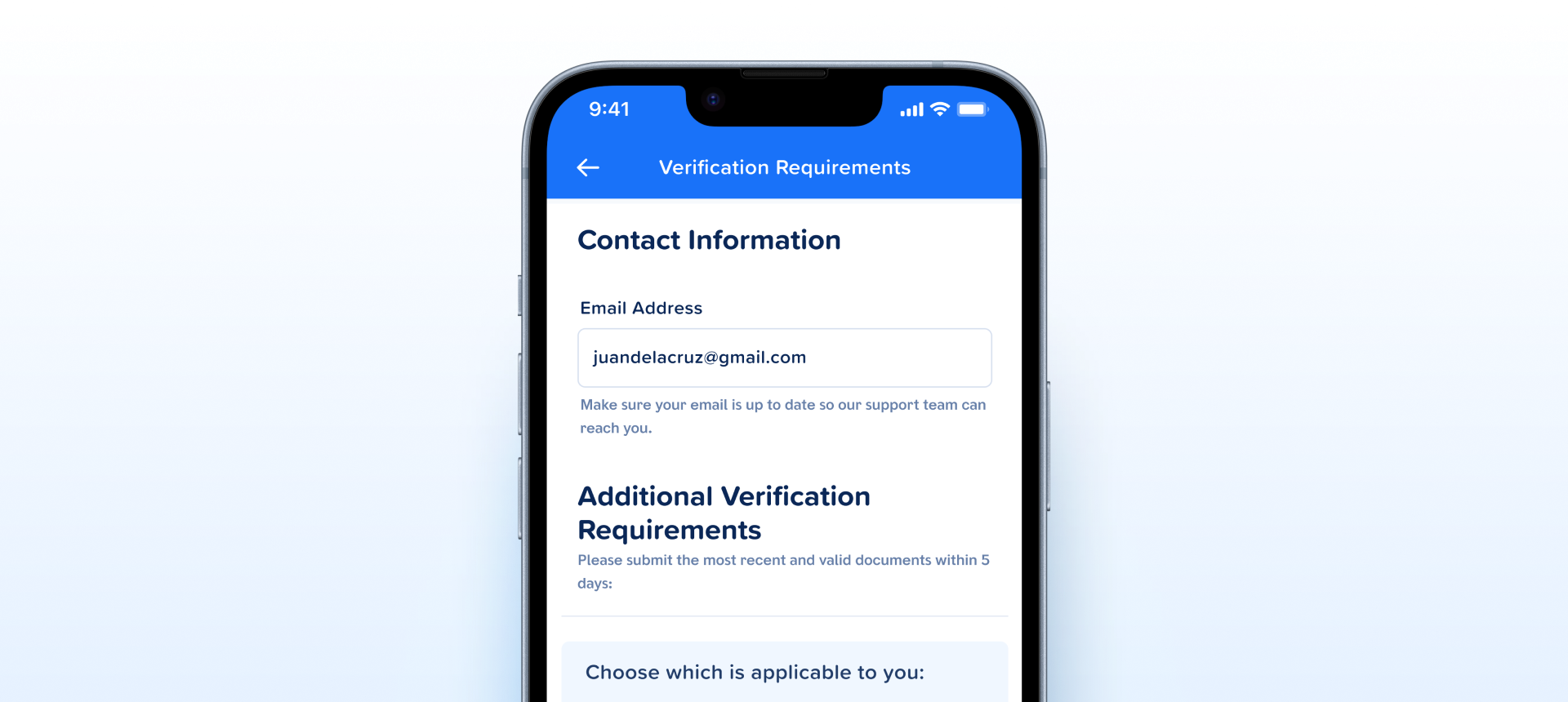
leading-icon with its own glyph, Disabled is a status, and the set is a clean Status × Size matrix.How the subtext message appears in a real product screen — helper text under the Email Address field on Verification Requirements, telling the user why the field matters.
leading-icon + content structure, with the glyph varying by status. The misnamed leadingLabel boolean is gone; text is now two named properties (#message and a trailing #label). Clean Status × Size matrix, 8 variants, no gaps.| State | iOS | Android | Figma Property | Notes |
|---|---|---|---|---|
| Default (helper) | Yes | Yes | Status=Default | Neutral #6780A9 text with a neutral leading icon. Standard helper copy. |
| Success | Yes | Yes | Status=Success | Success palette with a check glyph in the leading icon. |
| Error | Yes | Yes | Status=Error | Error #D61B2C text and icon, with the error glyph — not a recoloured checkmark. |
| Disabled | Yes | Yes | Status=Disabled | Muted text + icon, mirroring a disabled parent field. Added in the rebuild. |
| Size | Yes | Yes | Size=Small / Default | Small for dense rows (15px line), Default for standard form rows (18px). Composes with every Status. |
| Message + label | Yes | Yes | #message · #label | #message carries the helper/validation copy; #label is the trailing text on the right of the row. |
- v2.0: Anatomy made uniform — every variant now carries the same
leading-icon+contentstructure with the glyph varying by status, replacing the old split where Primary had no icon and Success / Error hardcoded theirs. (C4) - v2.0: Misnamed
leadingLabelboolean removed — the text surface is now two named properties,#messageplus a trailing#label, so the name no longer contradicts the rendered position. (C2) - v2.0:
Status=Disabledadded at both sizes, so a disabled parent field has a matched subtext state instead of consumers hiding it or hand-tuning opacity. (C5) - v2.0: Layer naming improved — the icon wrapper is now semantically
leading-icon, and the text nodes are exposed as#message/#labelproperties rather than generic frames. (C1) - v2.0: Status icon glyph confirmed to change per status (check for Success, error mark for Error) rather than a single recoloured checkmark — reviewed and verified. (C6)
- v2.0: Standalone-primitive question settled — it earns its place as a shared component rather than folding into a field slot, since Toggle with Label, Segmented Control - Group, Callout, and Upload File all compose it. (C4)
- v2.0: The leading icon's
shape_fullBOOLEAN_OPERATION is not tracked here — it is owned by the iconography team and fixed at the icon-library level, the same as the Peso Sign. Not a Subtext Message defect. (C6) - v2.1:
Size=BaserenamedSize=Defaultacross all 8 variants — the size step now reads naturally againstSmalland matches howDefaultis used as the standard step elsewhere in the DS. (C2)
- Give every variant a uniform leading-icon slot. v2.0: Applied — all four statuses share the same anatomy, with the glyph varying per status. Slot
- Fix the misnamed
leadingLabelboolean. v2.0: Applied — the boolean is gone; text is now#message+ trailing#label. Rename - Add a Disabled variant. v2.0: Applied —
Status=Disabledat both sizes, mirroring the parent field. State - Use semantic layer names. v2.0: Applied —
leading-iconplus#message/#labeltext properties. Rename - Rename
Size=BasetoDefault. v2.1: Applied —Small/Defaultacross all 8 variants. Rename
Component Playground
Layout
VStack
Typography
Colors
iOS — Swift Package Manager
.package(url: "https://github.com/AY-Org/eb-ds-ios", from: "1.0.0")
Android — Gradle (Kotlin DSL)
implementation("com.eastblue.ds:subtext-message:1.0.0")
Import
import EastBlueDS
import com.eastblue.ds.subtextmessage.*
Read off the property panel of set 26715:17362. Icon is an instance swap — a slot — so it is absent from the Style tab’s demo panel but mapped here.
| Figma Property | SwiftUI | Compose |
|---|---|---|
| Status — Default, Success, Error, Disabled | .ebStatus(.default / .success / .error / .disabled) | status = EBSubtextStatus.Default / Success / Error / Disabled |
| Size — Small, Default | .controlSize(.small / .regular) | size = EBSubtextSize.Small / Default |
| hasLeadingIcon — true, false | leadingIcon: Image? — omit to hide | leadingIcon: @Composable (() -> Unit)? = null |
| Icon (slot) — defaults to Checkmark (Circular) on every variant | .ebLeadingIcon(Image("checkmark-circular")) | leadingIcon = { Icon(EBIcons.CheckmarkCircular, null) } |
| hasTrailingLabel — true, false | trailingLabel: String? — omit to hide | trailingLabel: String? = null |
| — no Figma property (the message text) | EBSubtextMessage("Message content") | message = "Message content" |
EBSubtextMessage("Message content")
    .ebStatus(.default)
    .controlSize(.small)
.ebLeadingIcon(Image("checkmark-circular"))EBSubtextMessage(
message = "Message content",
status = EBSubtextStatus.Default,
size = EBSubtextSize.Small,
leadingIcon = { Icon(EBIcons.CheckmarkCircular, null) }
)EBSubtextMessage("Message content")
.ebStatus(.success)
.controlSize(.small)
.ebLeadingIcon(Image("checkmark-circular"))EBSubtextMessage(
message = "Message content",
status = EBSubtextStatus.Success,
size = EBSubtextSize.Small,
leadingIcon = { Icon(EBIcons.CheckmarkCircular, null) }
)EBSubtextMessage("Message content")
.ebStatus(.error)
.controlSize(.small)
.ebLeadingIcon(Image("checkmark-circular"))EBSubtextMessage(
message = "Message content",
status = EBSubtextStatus.Error,
size = EBSubtextSize.Small,
leadingIcon = { Icon(EBIcons.CheckmarkCircular, null) }
)EBSubtextMessage("Message content")
.ebStatus(.disabled)
.controlSize(.small)
.ebLeadingIcon(Image("checkmark-circular"))
.ebTrailingLabel("Label")EBSubtextMessage(
message = "Message content",
status = EBSubtextStatus.Disabled,
size = EBSubtextSize.Small,
leadingIcon = { Icon(EBIcons.CheckmarkCircular, null) },
trailingLabel = "Label"
)| Requirement | iOS | Android |
|---|---|---|
| Role and semantics | Not a control — expose as static text. Attach it to the field with .accessibilityValue so VoiceOver reads it with the field. | Static text. Put it in the field’s supportingText slot so TalkBack reads them together. |
| Error announcement | On Status=Error, set the field’s .accessibilityValue to the message — don’t rely on a separate live region. | Use semantics { error(msg) } on the field, not a standalone live region. |
| Icon is decorative | Mark the leading icon .accessibilityHidden(true) — the text carries the meaning. | Icon contentDescription = null; semantics go on the text. |
| Colour is not the only cue | Status is carried by colour alone today — the same checkmark ships on all four. Until per-status glyphs land, the message text must state the condition. | Same. Don’t let the icon be the error signal; write the condition into the message string. |
| Dynamic Type / font scaling | Caption type must scale with Dynamic Type. Don’t hard-lock the font size. | Use sp units and respect fontScale. |
| Contrast | Disabled is #C2CFE5 on white — roughly 1.6:1. Treat it as decorative and never the only copy on screen. | Same value, same caveat — pair a disabled field with its own accessible description. |
Do
Put the message in the parent field’s <code>supportingText</code> slot so validation state and message stay colocated.
Don't
Don’t render it as a separate sibling under a field — the field can’t coordinate its <code>Disabled</code> or error state with an external peer.
Do
Match <code>Size</code> to the field it sits under — <code>Small</code> (10 / 15) for dense forms, <code>Default</code> (12 / 18) otherwise.
Don't
Don’t expect <code>Size</code> to change the height. Both sizes are 22px tall with the same 16px icon; only the type scale moves.
Do
Write the condition into the message — "Enter 11 digits, starting with 09". Use <code>Default</code> for ambient hints and <code>Success</code> for meaningful post-validation confirmation.
Don't
Don’t rely on the icon to say which status this is. All four statuses ship the same <code>Checkmark (Circular)</code> glyph, recoloured.
Do
Turn <code>hasTrailingLabel</code> on for a right-aligned counter or unit that belongs with the message — it shares the message’s colour and type style.
Don't
Don’t put a second sentence in the trailing label. It is right-aligned in the same 22px row and will collide with a long message.
| ID | Criterion | Status | Notes |
|---|---|---|---|
| C1 | Layer Structure & Naming | Ready | Semantic throughout — leading-icon wraps the swap, content holds #message and #label. The shape_full BOOLEAN_OPERATION lives inside the shared icon component and is owned by the iconography team (v2.0). |
| C2 | Variant & Property Naming | Ready | PascalCase variant properties, booleans on the has prefix with lowercase values. The misnamed leadingLabel that rendered trailing is gone (v2.0), and Size=Base became Size=Default (v2.1). |
| C3 | Token Coverage | Needs Refinement | Two statuses paint the icon a different colour from the text — Default is #7E96BE icon on #6780A9 text, Success is #12AF80 on #048570 — while Error and Disabled use one value for both. Either the split is deliberate and needs two tokens per status, or it is drift. Bindings themselves cannot be read with the Talk To Figma plugin. |
| C4 | Native Mappability | Ready | A text row with an optional leading icon and an optional trailing label — maps directly to a field’s supportingText slot on both platforms, and stands alone where no field owns it. |
| C5 | Interaction State Coverage | Ready | Not an interactive control, so there is no pressed or focused state to cover. Status=Disabled was added at both sizes in v2.0, so a disabled parent field now has a matching subtext. |
| C6 | Asset & Icon Quality | Needs Refinement | The glyph is a proper vector instance, but all four statuses default the Icon swap to Checkmark (Circular) — confirmed on export_node_as_image, where Error renders a red checkmark. The swap already exists; the per-variant defaults are what need setting. |
4 Status × 2 Size = 8 variants, all built. hasLeadingIcon, hasTrailingLabel and the Icon swap are instance-level and add no variants. Both sizes are 189 × 22 with the same 16px icon — only the type scale changes.
| Status | Size | Node ID | Icon fill | Text fill |
|---|---|---|---|---|
| Default | Small | 26715:17363 | #7E96BE | #6780A9 |
| Default | Default | 26715:17369 | #7E96BE | #6780A9 |
| Success | Small | 26715:17375 | #12AF80 | #048570 |
| Success | Default | 26715:17381 | #12AF80 | #048570 |
| Error | Small | 26715:17387 | #D61B2C | #D61B2C |
| Error | Default | 26715:17393 | #D61B2C | #D61B2C |
| Disabled | Small | 26715:17399 | #C2CFE5 | #C2CFE5 |
| Disabled | Default | 26715:17405 | #C2CFE5 | #C2CFE5 |
4091:13864 with variants on 11855:*; the live set is 26715:17362. Every value below is re-read from it.Variant axis (Primary (helper) / Success / Error) became one card carrying Status · Size · hasLeadingIcon · hasTrailingLabel. Icon is an instance swap, so it is a static Properties row rather than a control.11855:* nodes with a Size=Base that v2.1 renamed. Now 8 rows on 26715:17363–26715:17405, each carrying its verified icon and text fills.Variant = Primary/Success/Error, Size = Base / Small, and the retired leadingLabel / trailingIcon booleans — one row per value in Prop = Value form. Now one prose row per property in panel order, with the Icon slot mapped.container / content layers, C2 the misnamed leadingLabel, C4 the standalone-versus-slot question, C5 the missing Disabled variant, C6 flattened non-vector icons — all resolved in v2.0 and recorded as such on the Overview tab. Rescored C1, C2, C4 and C5 Ready.com.eastblue.ds:form-elements:1.0.0 against a record already at v2.1.Secondary/Bold/Small Caption at Small and Secondary/Bold/Caption at Default, both matched. The banned Label font row (BarkAda Semibold · 12 / 18) is gone.Icon swap to Checkmark (Circular), so Status=Error renders a red checkmark — confirmed on export_node_as_image. This contradicts the v2.0 resolved note claiming the glyph changes per status. Logged against C6; the swap exists, the per-variant defaults do not.#7E96BE icon on #6780A9 text and Success is #12AF80 on #048570, while Error and Disabled use one value for both. Either two tokens per status are intended, or this is drift.leadingLabel removal, Status=Disabled, the layer renames, and Size=Base → Size=Default — but the changelog jumps from 1.0.0 to here. The entries need writing; their dates are not recorded anywhere I can read, so they are not invented here.shape_full — Inner 12×12 glyph carries a generic, flattened-style name. Suggests raster fill or boolean op rather than a proper vector Icon instance.
Opencontainer / content don't describe role.
OpensupportingText slot vs keep standalone) + C1 / C2 / C4 / C6.
Open