A small label used to flag status, counts, or category — supports multiple intents and densities.
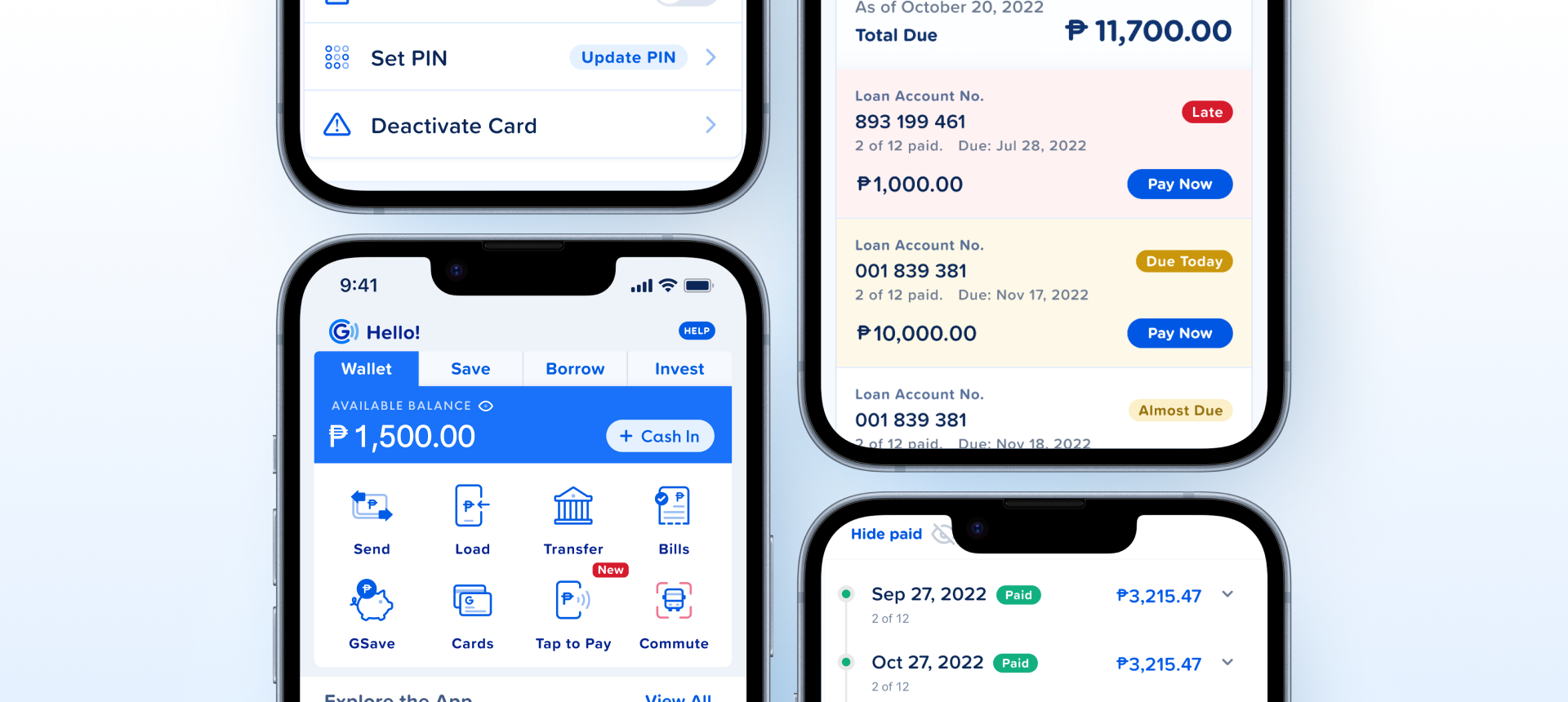
Negative and Muted Heavy Dashboard containers carry a hardcoded 0.9 opacity instead of a token. Bind it to close. The State values now match the token names.How the badge appears in real product screens — status labels on loan accounts (Late, Due Today, Almost Due), Paid markers on a payment history, and small labels in the app (Update PIN, HELP, New).
main/badge/{semantic}/{level}/), and the State values match the token names (Information, Positive, Notice, Negative, Muted). One issue: the Negative/Heavy and Muted/Heavy Dashboard containers have a hardcoded opacity: 0.9.| State | iOS | Android | Figma Property | Notes |
|---|---|---|---|---|
| Default | Yes | Yes | State + Level + Type | Display-only. All 7 states x 3 levels fully defined per type. |
- Hardcoded
opacity: 0.90removed from Danger/Heavy Transaction (21:111576) and Disabled/Heavy Transaction (3714:3863) inner containers. Both now at opacity 1, consistent with the other 66 variants. C3 Fixed - State property values renamed to match token semantic names across all 60 affected variants:
Info→Information,Success→Positive,Warning→Notice,Danger→Negative,Disabled→Muted. Figma State values now align 1:1 with token namespace — cleaner native mapping, no translation layer needed. C2 Fixed
- Add a leading icon slot. Common pattern in fintech status badges (warning triangle, check circle, info icon). Today consumers can't pair an icon with a badge without detaching. Slot
- Consider Medium / Light levels for Primary and Brand. These states only support Heavy today — if lower-emphasis variants are needed (subtle pill, ghost badge), add them now rather than waiting for a future break. Property
- Numeric count variant. Notification badges (inbox unread count, cart count) overlap Badge's visual space but aren't formalized here. Either document that consumers use Counter instead, or add a
countvariant with overflow handling ("99+"). Property
Component Playground
Layout
VStack
Typography
Colors
iOS — Swift Package Manager
.package(url: "https://github.com/AY-Org/eb-ds-ios", from: "1.0.0")
Android — Gradle (Kotlin DSL)
implementation("com.eastblue.ds:badge:1.0.0")
Import
import EastBlueDS
import com.eastblue.ds.badge.*
Every row maps a Figma component property to its native equivalent.
| Figma Property | SwiftUI | Compose |
|---|---|---|
| State — Primary, Brand, Information, Positive, Notice, Negative, Muted | state: .primary / .brand / .information / .positive / .notice / .negative / .muted | BadgeState.Primary / Brand / Information / Positive / Notice / Negative / Muted |
| Level — Heavy, Light, Medium | level: .heavy / .light / .medium | BadgeLevel.Heavy / Light / Medium |
| Type — Voucher, Transaction, Default, Dashboard | type: .voucher / .transaction / .default / .dashboard | BadgeType.Voucher / Transaction / Default / Dashboard |
// Positive badge -- heavy level
EBBadge("Completed", state: .positive, level: .heavy)

// Information badge -- light level
EBBadge("Pending", state: .information, level: .light)// Positive badge -- heavy level
EBBadge(
text = "Completed",
state = BadgeState.Positive,
level = BadgeLevel.Heavy
)
// Information badge -- light level
EBBadge(
text = "Pending",
state = BadgeState.Information,
level = BadgeLevel.Light
)EBBadge("50% OFF", state: .negative, level: .heavy, type: .voucher)EBBadge(
text = "50% OFF",
state = BadgeState.Negative,
level = BadgeLevel.Heavy,
type = BadgeType.Voucher
)EBBadge("Failed", state: .negative, level: .heavy, type: .transaction)EBBadge(
text = "Failed",
state = BadgeState.Negative,
level = BadgeLevel.Heavy,
type = BadgeType.Transaction
)EBBadge("Active", state: .positive, level: .light, type: .dashboard)EBBadge(
text = "Active",
state = BadgeState.Positive,
level = BadgeLevel.Light,
type = BadgeType.Dashboard
)| Requirement | iOS | Android |
|---|---|---|
| Accessibility label | accessibilityLabel("Status: Completed") | contentDescription = "Status: Completed" |
| Decorative mode | isAccessibilityElement = false (when status is conveyed elsewhere) | importantForAccessibility = no |
| Color contrast | Heavy levels meet WCAG AA (4.5:1+) | Heavy levels meet WCAG AA (4.5:1+) |
| Non-color indicator | Badge text conveys meaning alongside color | Badge text conveys meaning alongside color |
Do
Use semantic states that match the content meaning (Positive for completed, Negative for failed, Notice for pending).
Don't
Use badges for interactive elements -- badges are display-only status indicators.
Do
Use Heavy level for primary status indicators and Light/Medium for secondary or supporting context.
Don't
Use multiple Heavy badges in the same row -- visual noise. Use one Heavy + rest Light/Medium.
Do
Match badge Type to context: Default for general, Voucher for promos, Transaction for history, Dashboard for summaries.
Don't
Mix badge Types within the same list or group.
| ID | Criterion | Status | Notes |
|---|---|---|---|
| C1 | Layer Structure & Naming | Ready | Simple single-layer structure: container with text child. Semantic naming. |
| C2 | Variant & Property Naming | Ready | Clean enum properties: State, Level, Type. Minor: State names don't match token semantic names. |
| C3 | Token Coverage | Ready | All colors bound to main/badge/ tokens. Note: 2 variants have hardcoded opacity: 0.90. |
| C4 | Native Mappability | Ready | Maps to custom EBBadge on both platforms. Simple text + background shape. |
| C5 | Interaction State Coverage | Not Applicable | Display-only component. No interactive states needed. |
| C6 | Asset & Icon Quality | Not Applicable | No icons or assets. Text-only component. |
7 State values x 3 Level values x 4 Type values = 84 theoretical. Primary and Brand only support Heavy level, so actual count is (2 x 1 x 4) + (5 x 3 x 4) = 8 + 60 = 68 variants.
| State | Level | Types | Notes |
|---|---|---|---|
| Primary | Heavy | Default, Voucher, Transaction, Dashboard | 4 variants |
| Brand | Heavy | Default, Voucher, Transaction, Dashboard | 4 variants |
| Information | Light / Medium / Heavy | Default, Voucher, Transaction, Dashboard | 12 variants |
| Positive | Light / Medium / Heavy | Default, Voucher, Transaction, Dashboard | 12 variants |
| Notice | Light / Medium / Heavy | Default, Voucher, Transaction, Dashboard | 12 variants |
| Negative | Light / Medium / Heavy | Default, Voucher, Transaction, Dashboard | 12 variants |
| Muted | Light / Medium / Heavy | Default, Voucher, Transaction, Dashboard | 12 variants |
View full State × Level × Type breakdown (68 rows)
| State | Level | Type | Node |
|---|---|---|---|
| Primary | Heavy | Default | 18482:28973 |
| Brand | Heavy | Default | 18482:28975 |
| Information | Light | Default | 18482:28977 |
| Information | Medium | Default | 18482:28979 |
| Information | Heavy | Default | 18482:28981 |
| Positive | Light | Default | 18482:28983 |
| Positive | Medium | Default | 18482:28985 |
| Positive | Heavy | Default | 18482:28987 |
| Notice | Light | Default | 18482:28989 |
| Notice | Medium | Default | 18482:28991 |
| Notice | Heavy | Default | 18482:28993 |
| Negative | Light | Default | 18482:28995 |
| Negative | Medium | Default | 18482:28997 |
| Negative | Heavy | Default | 18482:28999 |
| Muted | Light | Default | 18482:29001 |
| Muted | Medium | Default | 18482:29003 |
| Muted | Heavy | Default | 18482:29005 |
| Primary | Heavy | Voucher | 18482:29007 |
| Brand | Heavy | Voucher | 18482:29009 |
| Information | Light | Voucher | 18482:29011 |
| Information | Medium | Voucher | 18482:29013 |
| Information | Heavy | Voucher | 18482:29015 |
| Positive | Light | Voucher | 18482:29017 |
| Positive | Medium | Voucher | 18482:29019 |
| Positive | Heavy | Voucher | 18482:29021 |
| Notice | Light | Voucher | 18482:29023 |
| Notice | Medium | Voucher | 18482:29025 |
| Notice | Heavy | Voucher | 18482:29027 |
| Negative | Light | Voucher | 18482:29029 |
| Negative | Medium | Voucher | 18482:29031 |
| Negative | Heavy | Voucher | 18482:29033 |
| Muted | Light | Voucher | 18482:29035 |
| Muted | Medium | Voucher | 18482:29037 |
| Muted | Heavy | Voucher | 18482:29039 |
| Primary | Heavy | Transaction | 18482:29041 |
| Primary | Heavy | Dashboard | 18482:29044 |
| Brand | Heavy | Transaction | 18482:29047 |
| Brand | Heavy | Dashboard | 18482:29050 |
| Information | Light | Transaction | 18482:29053 |
| Information | Light | Dashboard | 18482:29056 |
| Information | Medium | Transaction | 18482:29059 |
| Information | Medium | Dashboard | 18482:29062 |
| Information | Heavy | Transaction | 18482:29065 |
| Information | Heavy | Dashboard | 18482:29068 |
| Positive | Light | Transaction | 18482:29071 |
| Positive | Light | Dashboard | 18482:29074 |
| Positive | Medium | Transaction | 18482:29077 |
| Positive | Medium | Dashboard | 18482:29080 |
| Positive | Heavy | Transaction | 18482:29083 |
| Positive | Heavy | Dashboard | 18482:29086 |
| Notice | Light | Transaction | 18482:29089 |
| Notice | Light | Dashboard | 18482:29092 |
| Notice | Medium | Transaction | 18482:29095 |
| Notice | Medium | Dashboard | 18482:29098 |
| Notice | Heavy | Transaction | 18482:29101 |
| Notice | Heavy | Dashboard | 18482:29104 |
| Negative | Light | Transaction | 18482:29107 |
| Negative | Light | Dashboard | 18482:29110 |
| Negative | Medium | Transaction | 18482:29113 |
| Negative | Medium | Dashboard | 18482:29116 |
| Negative | Heavy | Transaction | 18482:29119 |
| Negative | Heavy | Dashboard | 18482:29122 |
| Muted | Light | Transaction | 18482:29125 |
| Muted | Light | Dashboard | 18482:29128 |
| Muted | Medium | Transaction | 18482:29131 |
| Muted | Medium | Dashboard | 18482:29134 |
| Muted | Heavy | Transaction | 18482:29137 |
| Muted | Heavy | Dashboard | 18482:29140 |
opacity: 0.90 removed from Danger/Heavy Transaction (21:111576) and Disabled/Heavy Transaction (3714:3863) inner containers. Both now at opacity 1, consistent with the other 66 variants.
FixedInfo -> Information, Success -> Positive, Warning -> Notice, Danger -> Negative, Disabled -> Muted. Figma State property now aligns 1:1 with token namespace (main/badge/{information|positive|notice|negative|muted}/{level}/). Cleaner Code Connect mapping with no translation layer.
Fixedmain/badge/{semantic}/{level}/ tokens.
Documentedopacity: 0.90 on container instead of using token-driven values. Inconsistent with other variants.
Fixed in 1.1.0