A linear progress indicator in 10% steps, from 0 to 100. Its track and fill colours come from colour variables.
Progress steps 0–100 in tens by design; the track and fill are vector lines bound to colour variables, which carry the success and error looks.How the progress bar appears in a real product screen — the GCredit credit-limit bar, showing ₱3,311.00 used out of 10,000.00.
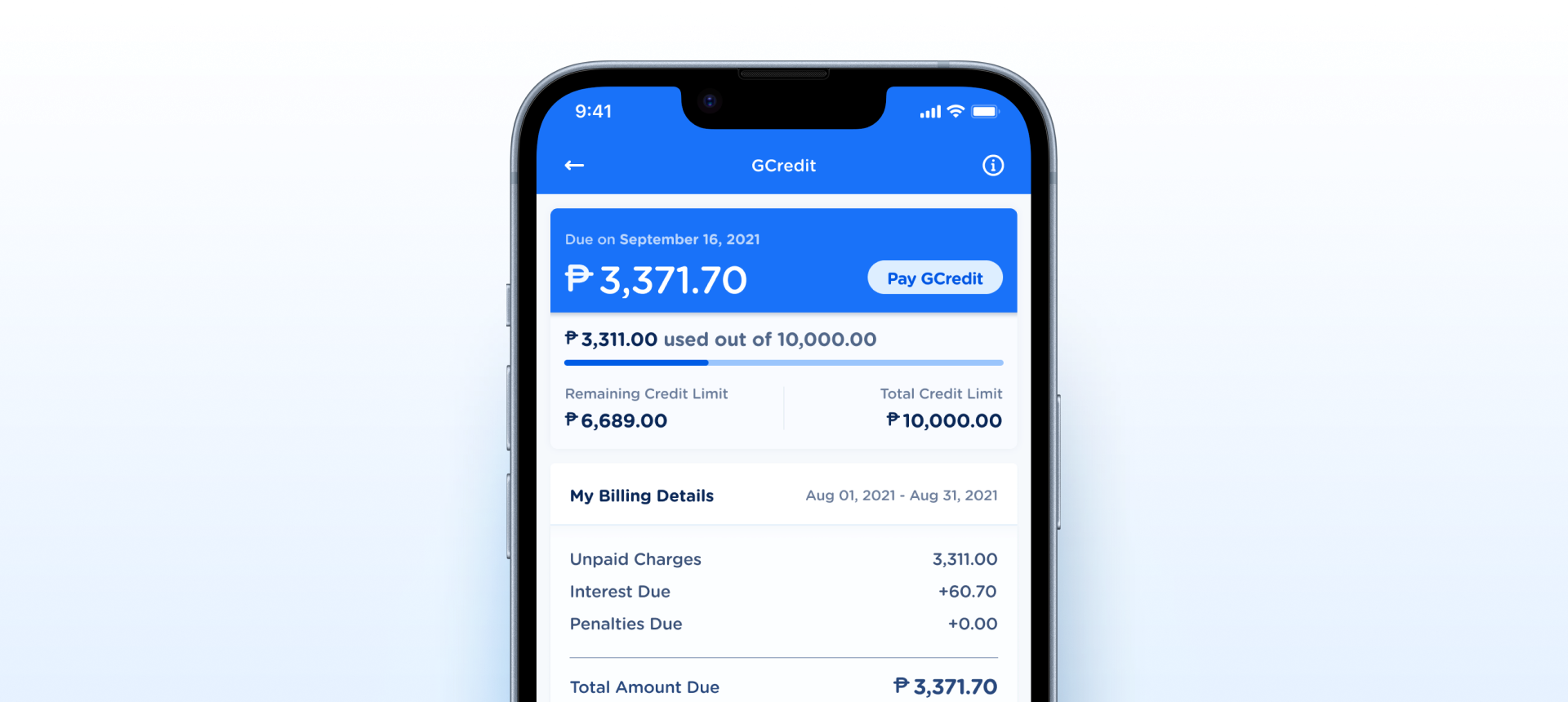
Progress steps 0–100 in tens by design, the layers are named track and fill, and colour states come from variables rather than variants.| State | iOS | Android | Figma Property | Notes |
|---|---|---|---|---|
| Determinate | Yes | Yes | <code>Progress=0…100</code> | The fill grows left to right in 10% steps. |
| Success / Error | Yes | Yes | Colour variables | Set by the colour variables bound to the track and fill, not by a variant. |
- Track and fill are raster PNGs: the
backandfrontlayers are vector lines with token-bound strokes; the set has no images — checked on node 18577:13227 (C6) - Progress is an enum of 10% steps, not a value: withdrawn — 10% steps are the intended design; owner decision, 6 Oct 2026 (C2)
- Layer names are structural (back / front), not semantic: resolved — the layers are track, fill-container and fill, node 4244:187349 (C1)
- No indeterminate, success, or error state modeled: withdrawn — states are not variants: success, error and other looks come from the colour variables bound to the track and fill; owner decision, 6 Oct 2026 (C5)
- Property name percentage reads as a unit, not a ratio: resolved — the property is Progress, node 4244:187349 (C2)
- Reuse existing semantic color tokens for success / error. Don't mint new hex values. Align with Alert / Badge semantic colors (
text/positive,text/negative) so the progress fill reads the same as the rest of the system. Token - Evaluate whether a bespoke
EBProgressBaris needed at all. SwiftUIProgressView(value:)and ComposeLinearProgressIndicatorare 1:1 matches for this component. If the only custom requirement is token-bound colors, a lightweight theming wrapper suffices; otherwise use the native primitive directly. Document either way. Composition - Document accessibility expectations.
role="progressbar",aria-valuenow/aria-valuemin/aria-valuemaxfor determinate; announce a localized label for indeterminate ("Loading…"). Both native APIs handle this automatically, but the web/hybrid consumer needs the spec. A11y
- Replace raster
back/frontimages with token-bound rectangles. Applied — track and fill are vector lines bound to colour variables. Asset - Rename layers
back→Trackandfront→Fill. Applied — the layers are track, fill-container and fill (node 4244:187349). Rename - Make the component width-flexible. Applied — the bar is set to Fill and stretches with its container. Property
Component Playground
Layout
VStack
Typography
Colors
iOS — Swift Package Manager
.package(url: "https://github.com/AY-Org/eb-ds-ios", from: "1.0.0")
Android — Gradle (Kotlin DSL)
implementation("com.eastblue.ds:progress-bar:1.0.0")
Import
import EastBlueDS
import com.eastblue.ds.progressbar.*
Read off the property panel of set 4244:187349: one variant property, Progress.
| Figma Property | SwiftUI | Compose |
|---|---|---|
| Progress — 0, 10, 20, 30, 40, 50, 60, 70, 80, 90, 100 | progress: Float (0–1) | progress: Float (0f–1f) |
| — no Figma property (the track and fill colours, set through colour variables) | .tint(Color) | color = …, trackColor = … |
| Requirement | iOS | Android |
|---|---|---|
| Progress role | ProgressView exposes the progressbar trait automatically. Set .accessibilityLabel("Verification progress") for context. | LinearProgressIndicator emits ProgressBarInfo via semantics automatically. Set Modifier.semantics { contentDescription = "Verification progress" }. |
| Value announcement | VoiceOver reads the current value (0–100%). For non-percentage ranges, use .accessibilityValue("\(step) of \(total)"). | TalkBack reads the progress fraction. For custom phrasing, set stateDescription. |
| Indeterminate | Announce a localized label ("Loading…"). Avoid announcing a fake percentage. | Same — LinearProgressIndicator() with no progress lambda handles this natively. |
| Contrast | Fill #005CE5 on track #D2E5FF = 3.1:1 — passes 3:1 for non-text graphics (WCAG 1.4.11). OK. | Same ratio. |
| Reduced motion | Indeterminate animation should honor UIAccessibility.isReduceMotionEnabled. Native ProgressView does this automatically. | Native LinearProgressIndicator already respects Animator.getDurationScale. |
Do
Use it for a known, measurable amount — a credit limit used, steps of a task completed.
Don't
Don’t use it for an open-ended wait. The set has no indeterminate state; use a loader instead.
Do
Show the value next to the bar, as GCredit does with ₱3,311.00 of 10,000.00.
Don't
Don’t rely on the bar alone to tell people an amount — it carries no text.
Do
Show success or error by switching the track and fill colours.
Don't
Don’t invent new colours or ask for a new variant for each status.
Do
Let the bar fill the width of its container.
Don't
Don’t give it a fixed width that leaves it short or overflowing on other screens.
| ID | Criterion | Status | Notes |
|---|---|---|---|
| C1 | Layer Structure & Naming | Ready | Layers are named track, fill-container and fill. |
| C2 | Variant & Property Naming | Ready | Progress, 0–100 in steps of 10 — the intended design. |
| C3 | Token Coverage | Ready | Track and fill strokes are bound to two library colour variables in all variants. Their names are not in the token database yet, so they read Missing rather than guessed. |
| C4 | Native Mappability | Ready | Maps 1:1 to ProgressView(value:) / LinearProgressIndicator. No custom gesture or web-only patterns. |
| C5 | Interaction State Coverage | Ready | One determinate look in 10% steps by design. Success, error and other states come from the colour variables, not from variants. |
| C6 | Asset & Icon Quality | Ready | Track and fill are vector lines with token-bound strokes; no raster assets. |
1 Progress setting × 11 values (0–100 in steps of 10) = 11 variants — the intended design.
| Property | Values | Count |
|---|---|---|
| Progress | 0, 10, 20, 30, 40, 50, 60, 70, 80, 90, 100 | 11 |
View full Progress breakdown (11 rows)
| Progress | Node |
|---|---|
| 0 | 4244:187350 |
| 10 | 4244:187352 |
| 20 | 4244:187356 |
| 30 | 4244:187360 |
| 40 | 4244:187364 |
| 50 | 4244:187368 |
| 60 | 4244:187372 |
| 70 | 4244:187376 |
| 80 | 4244:187380 |
| 90 | 4244:187384 |
| 100 | 4262:190138 |
percentage became Progress, and the layers are track / fill.back and front layers are vector lines with token-bound strokes; the set has no images.percentage variants into a single component with continuous progress: Float (0–1). Add state axis (determinate / indeterminate / success / error). Replace raster back/front with token-bound rectangles. Openback → Track and front → Fill. Aligns with native terminology. Openpercentage: 0 | 10 | … | 100 enum with progress: Float (0–1). Renaming from percentage to progress aligns with iOS / Compose conventions. OpenProgressView / LinearProgressIndicator support these out of the box. Open<img> back/front layers with token-bound rectangles using main/progress-bar/color/border-track and main/progress-bar/color/border. Open