A labeled Segmented Control with a slot below for helper text, avatars or other content.
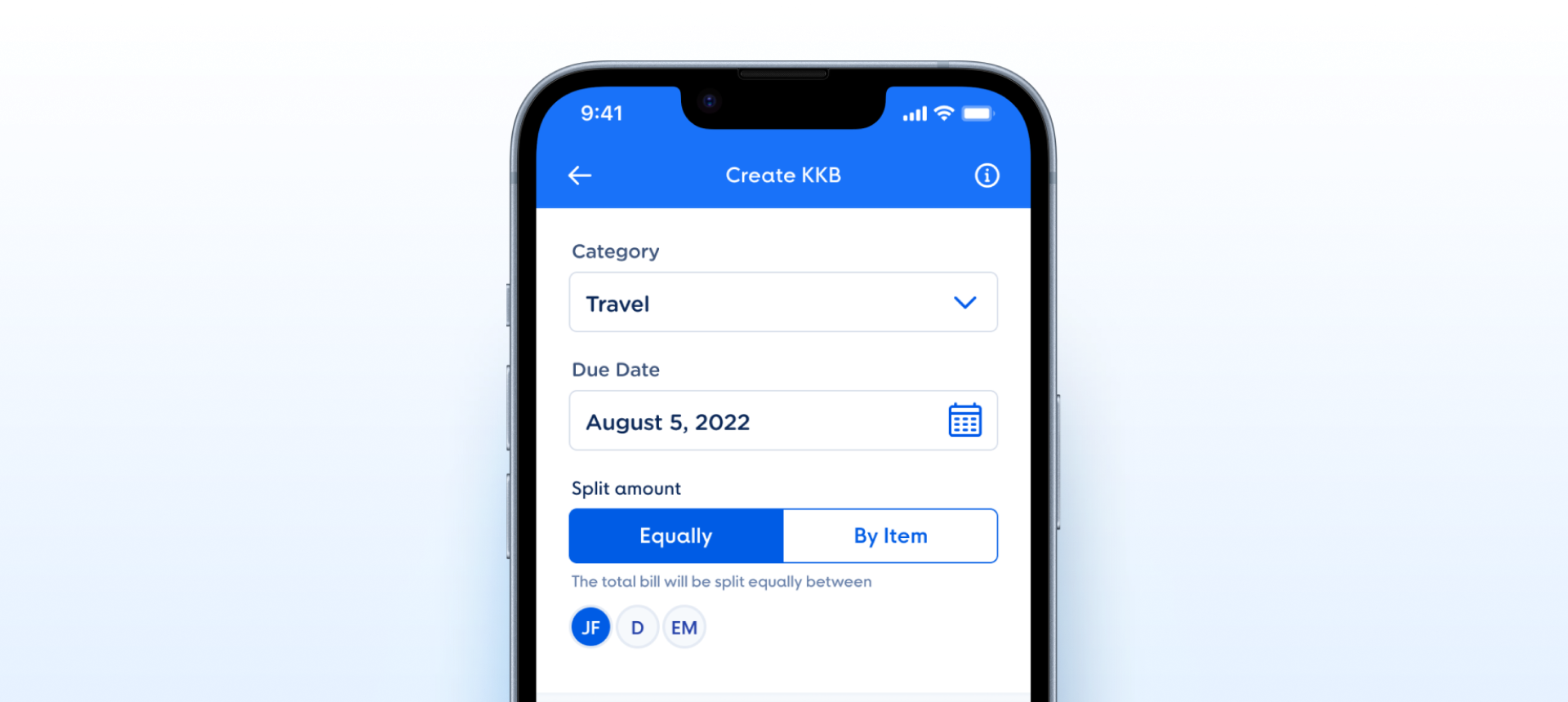
Slot Container, shown by hasSlotContainer, that holds helper text, avatars or any content.How the segmented control group appears in a real product screen — Split amount on Create KKB, with Equally / By Item, a subtext line and the avatars of the people splitting.
Slot Container, so no combination needs a variant.hasSlotContainer is a boolean over a named slot. The states live in the Segmented Control Button instances inside.numberOfTabs (2, 3, 4) is set from the Group’s own panel.- No way to change avatar count: the avatars sit in a named
Slot Container, which takes any number of avatars or other content — checked on node 26628:50778 (C4) - hasSubtext is a variant axis, not a boolean: the Group is now a single component and
hasSubtextis a boolean bound to the Subtext Message — checked on node 26628:50786 (C1) - Inherited "No Focused state": withdrawn — Segmented Control Button ships Default, Pressed and Disabled by design; on touch screens focus is drawn by the system, so no Focused variant is needed — owner decision, 6 Oct 2026, node 26628:50752 (C5)
- Inherited "segment labels are not text properties": moved to Segmented Control Button, where the label lives — node 26628:50752 (C4)
- Promote inner control to a data-driven Segmented Control. Tracked on the Toggle - Segmented Control component — once that ships
segments: [Segment], this group inherits the flexibility automatically. Family - Document the A11y model for the labeled group. Use
aria-labelledbyreferencing the label. Subtext getsaria-describedby. Avatars below should be a separate accessible region with their own labels. A11y
- Convert boolean axes to named slots. Applied — the subtext × avatars boolean axes are gone; the Group is one component and everything under the control goes in the named
Slot Container(node 26628:50786). Slot - Adopt Figma Slot for both subtext and avatars. Applied — the
Slot Containeris a native Figma SLOT, empty by default, that takes a Subtext Message, an Avatar group or any other content without detaching (node 26628:50786). Slot
Component Playground
Layout
VStack
Typography
Colors
iOS — Swift Package Manager
.package(url: "https://github.com/AY-Org/eb-ds-ios", from: "1.0.0")
Android — Gradle (Kotlin DSL)
implementation("com.eastblue.ds:toggle:1.0.0")
Import
import EastBlueDS
import com.eastblue.ds.toggle.*
Read off the property panel of component 26628:50786: one boolean, hasSlotContainer, and one slot, Slot Container. Nothing else is exposed.
| Figma Property | SwiftUI | Compose |
|---|---|---|
| hasSlotContainer — true, false | presence of the .ebSlotContainer { } trailing closure | slotContainer: @Composable (() -> Unit)? = null |
| Slot Container (slot) — empty by default; holds helper text, avatars or other content | .ebSlotContainer { HStack(spacing: 2) { … } } | slotContainer = { … } |
// hasSlotContainer = false — header and control only, 312 × 62
EBSegmentedControlGroup(
    label: "Label",
    segments: ["Label", "Label"],
    selectedIndex: $selected
)// hasSlotContainer = false — header and control only, 312 × 62
EBSegmentedControlGroup(
label = "Label",
segments = listOf("Label", "Label"),
selectedIndex = selected
)// hasSlotContainer = true — the subtext goes in the slot, 312 × 102
EBSegmentedControlGroup(
label: "Label",
segments: ["Label", "Label"],
selectedIndex: $selected
)
.ebSlotContainer {
EBSubtextMessage("Use this space for your subtext.")
}// hasSlotContainer = true — the subtext goes in the slot, 312 × 102
EBSegmentedControlGroup(
label = "Label",
segments = listOf("Label", "Label"),
selectedIndex = selected,
slotContainer = {
EBSubtextMessage(message = "Use this space for your subtext.")
}
)// hasSlotContainer = true (the default) — Figma ships the slot empty;
// fill it with any content, here an Avatar Group.
EBSegmentedControlGroup(
label: "Label",
segments: ["Label", "Label"],
selectedIndex: $selected
)
.ebSlotContainer {
EBAvatarGroup(avatars: recentContacts)
}// hasSlotContainer = true (the default) — Figma ships the slot empty;
// fill it with any content, here an Avatar Group.
EBSegmentedControlGroup(
label = "Label",
segments = listOf("Label", "Label"),
selectedIndex = selected,
slotContainer = {
EBAvatarGroup(avatars = recentContacts)
}
)| Requirement | iOS | Android |
|---|---|---|
| Label association | Use .accessibilityLabel on the segmented row referencing the header text, so the control is never announced as a bare "Label, Label". | Wrap in Modifier.semantics { contentDescription = label } on the group container. |
| Selection semantics | The segments are a single-select set — .accessibilityAddTraits(.isSelected) on the active one, and announce position ("1 of 2"). | Use Modifier.selectableGroup() on the row and selected = true on the active segment. |
| Minimum target | The segment is 156 × 40pt. 40 is under the 44 × 44pt minimum — add 4pt of hit area above and below rather than resizing the control. | Same geometry in dp; 40 is under the 48 × 48dp minimum, so extend the touch target without changing the drawn height. |
| Subtext announcement | Wire as .accessibilityHint on the segmented row so VoiceOver reads "Label, hint: Use this space for your subtext." | Use stateDescription on the row. |
| Slot container | A separate accessibility region — the slot is arbitrary content and must carry its own labels, not inherit the group’s. | Same. Give the slot its own contentDescription per child; do not merge it into the group semantics. |
| Dynamic Type / font scaling | Header is 14pt and the segment labels 16pt — both must scale. The 40pt control height has to grow with them. | Use sp for all three text layers and let the 40dp row expand with fontScale. |
Do
Use the group when a segmented control needs a heading — it bundles <code>FormGroup Header</code> and <code>Segmented Control</code> over a <code>Slot Container</code> at a fixed rhythm.
Don't
Don’t reach for it to get a bare segmented control. With no header to show, use <code>Segmented Control</code> directly — the group always renders its 22px header row.
Do
Put helper or validation copy in the <code>Slot Container</code> as a Subtext Message, and turn the slot off with <code>hasSlotContainer</code> when there is nothing to show.
Don't
Don’t put validation copy in the header. The header is <code>Primary/Label/Light/Small</code> at full-strength <code>#0A2757</code> and reads as a title, not a message.
Do
Use <code>Slot Container</code> for content that belongs to the selection — the recent-contact avatars it ships with are the reference case.
Don't
Don’t leave <code>hasSlotContainer</code> off and expect the avatars to show. It defaults to <code>False</code>, so the slot and its three Avatars are invisible until a consumer opts in.
Do
Set the segment labels and the selected index in code.
Don't
Don’t look for them in Figma. The nested <code>Segmented Control</code> is not exposed on the group, so segment count, labels and selection are all code-only — two segments is what the component draws.
| ID | Criterion | Status | Notes |
|---|---|---|---|
| C1 | Layer Structure & Naming | Ready | Every part is a named instance — FormGroup Header, Segmented Control — and the slot is a real SLOT node named Slot Container. |
| C2 | Variant & Property Naming | Ready | One property, hasSlotContainer, a boolean with the has prefix. The old split — hasSubtext as a variant beside a boolean — is gone with the subtext moving into the slot. |
| C3 | Token Coverage | Ready | The group owns no colour of its own — every value belongs to a nested component or to the slot’s example content, so there is nothing here to leave unbound. Bindings themselves cannot be read with the Talk To Figma plugin, so the Style tab’s token column is — rather than asserted. |
| C4 | Native Mappability | Ready | A vertical container with a header, a control, and two optional rows — one a string, one an arbitrary slot. Maps to a single view on both platforms. The named-slot restructure the 1.0.0 assessment asked for has landed in Figma. |
| C5 | Interaction State Coverage | Ready | The group has no states of its own, which is correct. The inner Segmented Control is an exposed nested instance, and its segments carry Default, Pressed and Disabled. |
| C6 | Asset & Icon Quality | Not Applicable | No assets owned by this component. The Avatars inside Slot Container are example content and belong to the Avatar component. |
No variant properties × 1 component = 1. hasSlotContainer is a boolean and Slot Container is a SLOT — both change what renders without adding a variant. Size below is as Figma ships it, with the empty slot showing.
| Component | Node ID | Size | Parts |
|---|---|---|---|
| Segmented Control - Group | 26628:50786 | 312 × 102 | Header 22 + Segmented Control 40 + Slot Container 40 |
hasSubtext=true|false variant axis is gone; hasSubtext is now a boolean bound to the Subtext Message. The page moved from the deleted set 26628:50778 to 26628:50786.hasSubtext and the fixed Subtext Message are gone; the Slot Container, empty by default and shown by hasSlotContainer, now holds helper text, avatars or other content. C2 → ready.hasSlotContainer (on, as Figma ships it), and draws the slot empty; the Selected, Subtext and Avatars controls are gone. The subtext snippet now passes EBSubtextMessage as slot content.hasSlotContainer and Slot Container.isExposedInstance), so its numberOfTabs is set from the Group’s panel — it was never fixed. C5 → ready for the same reason; the states live in its segment buttons.Slot Container, which takes any number of avatars or other content.Slot Container. Still open: hasSubtext is a variant axis, not a boolean.27:30940; the live set is 26628:50778. This entry is dated when the change was found, not when it was made — nothing in the file records the latter.Slot Container is now a real SLOT node holding three 32px Avatars, replacing the baked-in avatar row. This applies the standing Adopt Figma Slot recommendation.subtext × avatars produced four variants; the set now ships two — hasSubtext is the only variant axis, and hasSlotContainer is a boolean property that changes what renders without doubling the matrix.Selected control was documented that Figma never had. The Style tab offered First / Second; the nested Segmented Control is listed under Nested instances and exposes nothing, so selection is code-only. The control is gone and Property Mapping now says so.hasSubtext and hasSlotContainer as toggles; Slot Container and the nested Segmented Control as static rows, since a slot takes no control.Primary/Label/Light/Small, segment label Primary/Label/Base, subtext Secondary/Bold/Caption — all three matched. The tab previously wrote the header as a font spec, Proxima Soft Semibold · 16 / 16, at a size the layer does not use (it is 14 / 14).<clipPath>, the way Figma exports it — the clip did not resolve in injected markup, so the blue half rendered with square left corners. Redrawn as an explicit rounded path; verified in a browser.subtext=yes/no / avatars=yes/no axes, and the Variants Inventory listed four 27:309xx nodes at 366 wide.hasSubtext is a variant with true/false values while hasSlotContainer is a boolean property. Both toggle one row’s presence; only one doubles the variant count.Segmented Control, which the group does not expose — so every instance draws the same two segments with the first selected.—. The previous record’s paths were not carried forward — they named the retired node.meta.node still points at the retired 27:30940, and the Overview tab’s four open issues ask for changes this rebuild already made. Both are Overview scope and need a Component Review run — until then the Code tab and the Overview tab disagree.subtext × avatars. Composes Toggle - Segmented Control + Subtext Message + Avatar. Documentedsubtext?, avatars?). Drops variant count from 4 to 1 and unlocks any future trailing content. Open