A small numeric badge used to display unread or pending counts on icons and rows.
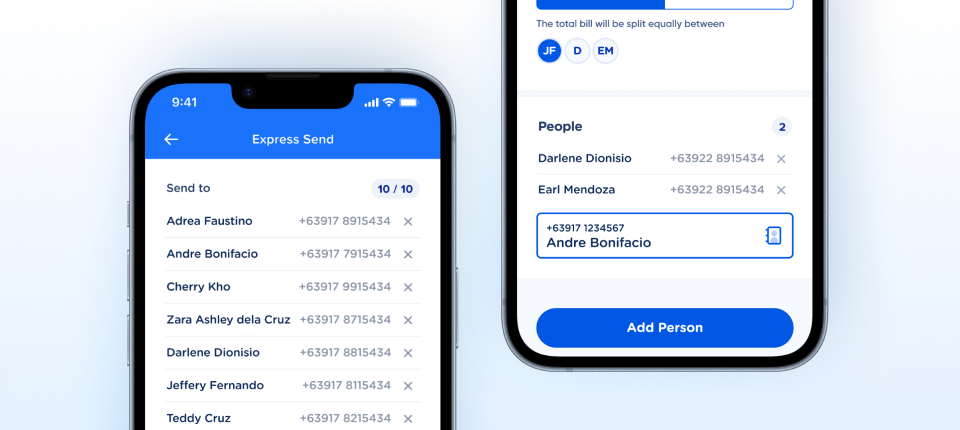
State and hasLimit follow the naming guidelines, every layer has a semantic name, and Count and Limit are text properties.How the counter appears in real product screens — a limit counter (10 / 10) beside the Send to list in Express Send, and a count (2) beside the People section when splitting a bill.
State and hasLimit follow the Property Naming Guidelines, all four variants are dimensionally consistent, and every frame and text layer carries a correct, distinct semantic name — Count, Separator, Limit, Plus, LimitGroup.| State | iOS | Android | Figma Property | Notes |
|---|---|---|---|---|
| Default | Yes | Yes | State=Default | Brand-blue label (#072592) on the neutral chip. The normal presentation. |
| Disabled | Yes | Yes | State=Disabled | Muted label (#C2CFE5) on the same bg. Documented as a disabled context — a Counter sitting inside a disabled row or field. Zero-count styling is no longer modeled as a variant; derive it from count in code. |
| With limit | Yes | Yes | hasLimit=True | Renders "N / M" (e.g. "3 / 10") — for slot/limit displays like "beneficiaries used". |
| Without limit | Yes | Yes | hasLimit=False | Renders a single integer in a 24×24 circle. Used for unread counts, inbox badges. |
| Pressed / Focused | N/A | N/A | — | Counter is display-only — no interactive states. |
| Overflow (99+) | Yes | Yes | <code>Overflow</code> layer | A hidden Overflow frame holding a + glyph sits in the two hasLimit=False circle variants only — it was removed from the slash format in v2.1. Single-integer clamps at maxDisplay (default 99) → "99+"; slash format clamps at limit. Clamping is handled in code. |
-
with limitrenamed tohasLimit. v2.0: Rebuilt on node4675:21497. The property is nowhasLimitwithTrue/Falsevalues — a real Figma boolean toggle that maps directly to SwiftBool/ KotlinBoolean. TheStateaxis was also recased to PascalCase, bringing both properties in line with the Property Naming Guidelines. (C2) C2 · Variant & Property Naming - Applied — Rename recommendation shipped. v2.0: Applied —
with limit: yes/no→hasLimit: True/False, exactly as recommended. Logged here rather than in an Applied tab becauseoverview.appliedRecommendationsdoes not yet exist in the schema. (Rename) C2 · Variant & Property Naming -
State=Disabledsemantics confirmed. v2.0: Closed by owner decision —Disableddescribes the control context (a Counter sitting inside a disabled row or field), not a zero count. Zero-count styling is derived fromcountin code and is deliberately not modeled as a variant. This also settles the contrast question: the muted label (#C2CFE5 on #EEF2F9, 1.4:1) is disabled text, which WCAG 1.4.3 exempts. (Docs) C2 · Variant & Property Naming - Overflow clamp rule settled. v2.0: Closed by owner decision — no further spec work required. Single-integer format clamps at
maxDisplay(default 99) and renders "99+"; slash format clamps atlimitwhencount > limit. Handled in code; the FigmaOverflowlayer only supplies the+glyph. (C5) C5 · Interaction State Coverage - Two use cases documented. v2.0: Closed — single-integer answers how many of X are there (notifications, unread, pending); slash format shows progress against capacity (slots used, steps completed). Captured in the Behavior table and the Style tab; no further action. (Docs) C4 · Native Mappability
- Counter ↔ Badge relationship documented. v2.0: Closed — Counter is numeric (a count or progress); Badge is a status or tag label (Success, Premium). Teams pick by whether the content is a number. No further action. (Docs) C4 · Native Mappability
-
Disabledvariant width evened up. v2.1:State=Disabled, hasLimit=Truewent from 61 × 24 to53 × 24, matching itsDefaultsibling for identical content; the component set narrowed from 109 to 101. Achieved by removing theOverflowframe from the slash-format variants rather than excluding it from layout. Instances no longer jump 8px when switching state. (C1) C1 · Layer Structure & Naming - Count and separator layers renamed. v2.1: Applied — all four count layers are now
Count(4675:21499·4675:21503·4675:22735·4675:21509) and both slash glyphs areSeparator(4675:21500·4675:21504). The property surface is legible for the first time. Two limit layers were misnamed in the same sweep — tracked as an open issue. (Rename) C1 · Layer Structure & Naming - Overflow glyph layers renamed to
Plus. v2.2:4681:19238and4681:19235went from#overflow-valuetoPlus— PascalCase, no hash prefix, per the Property Naming Guidelines. Every layer in the two circle variants now carries a correct semantic name. (C2) C2 · Variant & Property Naming - Text layer naming complete. v2.3:
4675:21501and4675:21505renamed toLimit, resolving the duplicate-Countcollision in the slash-format variants. Every text layer in the set now carries a correct, distinct semantic name —Count×4,Separator×2,Limit×2,Plus×2 — verified by characters, not position. Closes the C1 naming issue opened at initial assessment. (C1) C1 · Layer Structure & Naming -
Containerrenamed toLimitGroup. v2.4:4675:23030and4675:23007renamed from the genericContainertoLimitGroup. Every frame and text layer in the set now carries a semantic name — C1 is fully clean. (C1) C1 · Layer Structure & Naming - Text properties confirmed exposed. v2.4: Closed on owner confirmation —
CountandLimitare exposed as text properties, so consumers set values without detaching. This closes the "hardcoded text" issue raised at initial assessment. Not independently verifiable from the read-only assessment tooling, which cannot read component property definitions. (C2) C2 · Variant & Property Naming -
Overflowlayer binding confirmed. v2.4: Closed on owner confirmation — theOverflowframes in the twohasLimit=Falsecircle variants (4681:19237·4681:19234) are property-bound, not manual visibility overrides. Their removal from the slash-format variants in v2.1 was deliberate, and resolves the nonsensical0 / 10+rendering. Clamping stays in code. (C5) C5 · Interaction State Coverage
Component Playground
Layout
VStack
Typography
Colors
iOS — Swift Package Manager
.package(url: "https://github.com/AY-Org/eb-ds-ios", from: "1.0.0")
Android — Gradle (Kotlin DSL)
implementation("com.eastblue.ds:counter:1.0.0")
Import
import EastBlueDS
import com.eastblue.ds.counter.*
State and hasLimit are the set’s two variant properties. Count and Limit are exposed as text properties (owner confirmation, v2.4); the Overflow frame’s Plus glyph is property-bound. Neither the text properties nor the overflow binding are readable with the plugin.
| Figma Property | SwiftUI | Compose |
|---|---|---|
| State — Default, Disabled | .disabled(true) | enabled = false |
| hasLimit — True, False | .ebLimit(10) when True | limit = 10 when True, else null |
| Count (text) | count: Int | count = 0 |
| Limit (text) | .ebLimit(_:) | limit = 10 |
| Overflow › Plus (property-bound glyph) | maxDisplay: Int = 99 — renders "99+" past it | maxDisplay = 99 — renders "99+" past it |
EBCounter(count: 0)
.ebLimit(10)EBCounter(
count = 0,
limit = 10
)| Requirement | iOS | Android |
|---|---|---|
| Context-aware label | .accessibilityLabel("3 unread") or "3 of 10 used" — the number alone is meaningless. | contentDescription = "3 unread" / "3 of 10 used" on the pill. |
| Zero and overflow | Announce "no unread" at 0 and "more than 99" past maxDisplay — never read the plus glyph. | Same two phrasings; the plus glyph is decorative. |
| Disabled context | The pill inherits the disabled trait of the row or field it sits in; it is never disabled on its own. | Semantics merge with the parent row; no separate enabled handling on the pill. |
| Contrast | #072592 on #EEF2F9 is 10.4:1; the disabled #C2CFE5 is decorative and must not carry information. | Same values — the pill colours are fixed, not themed. |
Do
Use the single integer for how-many counts — unread, pending, notifications.
Don't
Don’t use the single integer for progress against a capacity.
Do
Use hasLimit for slots used against a capacity — "3 / 10 beneficiaries".
Don't
Don’t let count exceed limit; clamp it in code.
Do
Keep maxDisplay at 99 so the pill stays two digits plus the glyph.
Don't
Don’t show four-digit counts — "999+" is the widest the pill should get.
| ID | Criterion | Status | Notes |
|---|---|---|---|
| C1 | Layer Structure & Naming | Ready | Count, Separator, LimitGroup › Limit, Overflow › Plus — read on 4675:21502 and 4675:21508. |
| C2 | Variant & Property Naming | Ready | State and hasLimit with Title Case values; the boolean is a real True / False. |
| C3 | Token Coverage | Ready | All four text layers resolve to Primary/Label/Small. Colour variable bindings are not readable with the plugin — confirm in Dev Mode. |
| C4 | Native Mappability | Ready | One enum, one boolean, two text values — maps 1:1 onto EBCounter. |
| C5 | Interaction State Coverage | Ready | Default and Disabled built for both hasLimit values; the pill is not a tap target, so no Pressed. |
| C6 | Asset & Icon Quality | Not Applicable | No icons or images — text layers only. |
2 State × 2 hasLimit = 4 variants
| State | hasLimit | Node | Dimensions |
|---|---|---|---|
| Default | True | 4675:21502 | 53 × 24 |
| Default | False | 4675:21508 | 24 × 24 |
| Disabled | True | 4675:21498 | 53 × 24 |
| Disabled | False | 4675:22734 | 24 × 24 |
State or a boolean — with State and hasLimit in the panel; colours, the Primary/Label/Small text style and the 53 / 24 widths read off 4675:21502 and 4675:21508. Padding, gap, alignment and colour tokens are not readable with the plugin and stay —.State × hasLimit schema. Installation on the solo coordinates, Property Mapping one row per property with the overflow rule, Usage Snippet and Guidelines added, Scorecard notes tied to the live nodes, Variants Inventory moved from the 18482 nodes to the four live nodes.with limit renamed to hasLimit; Applied — Rename recommendation shipped; State=Disabled semantics confirmed; Overflow clamp rule settled; Two use cases documented; Counter ↔ Badge relationship documented; Disabled variant width evened up; Count and separator layers renamed; Overflow glyph layers renamed to Plus; Text layer naming complete; Container renamed to LimitGroup; Text properties confirmed exposed; Overflow layer binding confirmed.with limit → hasLimit, parameterize count + limit, add 99+ overflow. Variant count stays at 4. Openwith limit: yes/no → hasLimit: true/false. Direct Swift Bool / Kotlin Boolean mapping. Opencount: Int + limit: Int?; drop hardcoded text. Derive state from count. OpenmaxDisplay (default 99); counts beyond render "99+" in single-integer format, and clamp in slash format. Open