A circular radio control for single-select groups. 39 variants across Style (Default/Check) × State (Default/Pressed/Disabled) × Size (Large/Medium/Small) × isSelected × isError.
Style, State, Size, isSelected, isError — with a vector ring and dot at all three sizes, and a real Pressed state.How the radio button appears in real product screens — Yes / No answers on a Fill Information form, and a choice of when a recurring payment ends.
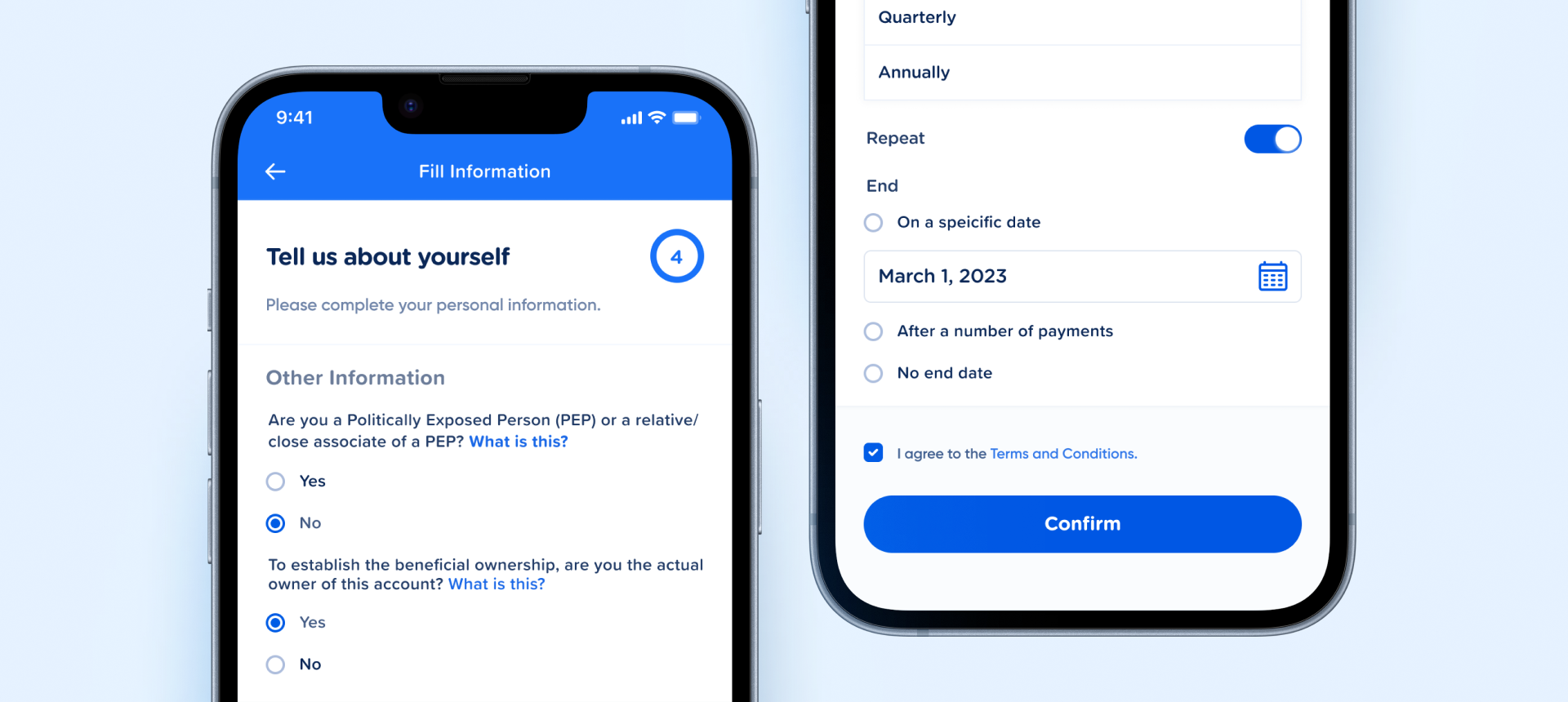
container → circle (fill) + ring (stroke) — so tokens propagate to all three. Carries its own selection, error, and interaction styling; the raster imgContainer export is gone.Style × State × Size × isSelected × isError. No conditional axes and no invalid combinations: pressed lives in State alongside Disabled, error is its own boolean, and booleans are lowercase true/false. Matches Button v4.0 and Select Item.container / circle / ring) and the Check style is a vector icon instance rather than a drawn shape.| State | iOS | Android | Figma Property | Notes |
|---|---|---|---|---|
| Default (unselected) | Yes | Yes | State=Default, isSelected=false | Empty ring. Resting state for every unpicked option in a group. |
| Selected | Yes | Yes | State=Default, isSelected=true | Brand ring + inner dot, both #005CE5. Exactly one option per group carries this. |
| Pressed | Yes | Yes | State=Pressed | Ring and dot darken to #2340A9. Combines with either isSelected value. Derived at runtime from the touch interaction — not a parameter you pass. |
| Disabled | Yes | Yes | State=Disabled | Muted ring and dot. Ships at both isSelected values, so a disabled group can render its unselected options. |
| Error | Yes | Yes | isError=true | Ring and dot switch to #D61B2C. Orthogonal to State — combines with Default and Pressed. |
| Selected — check style | Yes | Yes | Style=Check, isSelected=true | Filled circle + vector checkmark instead of a dot. For single-select list rows; only meaningful when selected. |
- v2.0: Variant matrix restructured into orthogonal axes —
Style(Default/Check) ×State(Default/Pressed/Disabled) ×Size(Large/Medium/Small) ×isSelected×isError.selectedno longer conflates selection with modifier states, and no property is conditional on another. (C2) - v2.0: Pressed folded into
State, error split into an orthogonalisErrorboolean — removes the illegalDisabled + Pressedcombination the old two-axis model allowed, and matches the Button v4.0 / Select Item pattern. (C2/C4) - v2.0: Large radio rebuilt as layered vectors —
container→circle(ELLIPSE fill) +ring(ELLIPSE stroke), both on#005CE5. The pre-renderedimgContainerraster is gone, so token changes now propagate to every size. (C3) - v2.0: Misleading
.base/checkboxframe renamed — layers are nowcontainer/circle/ring. (C6) - v2.0: Pressed state added —
State=Pressedcovers touch feedback across Default, Check, and error variants (#2340A9). Focused is N/A on mobile: touch has no focus ring. (C5) - v2.0:
Disabled+isSelected=falseadded at all three sizes — a disabled radio group can now render its unselected options, which was previously impossible. (C5) - v2.0: Boolean variant values lowercased to
true/false, matching the C2 convention. (C2) - v2.0: Checkmark promoted to a vector icon instance (
Checkmark→Grid) rather than a drawn shape. (C6) - v2.0:
Disableddeliberately excludesisError— confirmed as an intentional omission, not a gap. A locked control offers the user no path to resolve a validation error, so the combination has no affordance and ships no variants. (C5) - v2.0:
Style=Checkconfirmed as intentional — retained rather than retired, now shipping as a vector icon instance with full Default / Pressed / Disabled coverage. Usage guidance added to disambiguate it from Checkbox. (C6)
- Split properties into orthogonal axes. v2.0: Applied — and taken further than proposed.
Style×State×Size×isSelected×isError, with pressed folded intoStateand error split out as its own boolean. No invalid combinations remain. Property - Rebuild the large radio as vector layers. v2.0: Applied — every size is now
container→circle+ringvector ellipses. Tokens flow to all three sizes. Asset - Rename the internal frame. v2.0: Applied —
.base/checkboxis gone; layers arecontainer/circle/ring. Rename - Add pressed states. v2.0: Applied —
State=Pressedmaps touch feedback to#2340A9. Focused was dropped as N/A on mobile. State - Document when to use Check vs Default. v2.0: Applied — the Check style was reviewed and deliberately retained rather than retired. Usage guidance now disambiguates it from Checkbox: Check for single-select list rows, Default (filled dot) for forms where real Checkboxes appear alongside. Docs
- Record
Disabled + isErroras an intentional omission. v2.0: Applied — reviewed and confirmed deliberate. A locked control offers no path to resolve a validation error, so the combination ships no variants by design. Docs
Component Playground
Layout
VStack
Typography
Colors
iOS — Swift Package Manager
.package(url: "https://github.com/AY-Org/eb-ds-ios", from: "1.0.0")
Android — Gradle (Kotlin DSL)
implementation("com.eastblue.ds:radio:1.0.0")
Import
import EastBlueDS
import com.eastblue.ds.radio.*
| Figma Property | SwiftUI | Compose |
|---|---|---|
| Style — Check, Default | .ebRadioStyle(.check / .default) | style = EBRadioStyle.Check / Default |
| State — Default, Pressed, Disabled | .disabled(true) for Disabled; Pressed is the press gesture, not a parameter | enabled = false for Disabled; Pressed comes from interactionSource |
| Size — Small, Medium, Large | .controlSize(.small / .regular / .large) | size = EBRadioSize.Small / Medium / Large |
| isSelected — false, true | isSelected: Bool | selected: Boolean |
| isError — false, true | .ebInvalid(true) | isError = true |
| — no Figma property (selection callback) | onTap: () -> Void | onClick: () -> Unit |
// Unselected — the empty ring
EBRadioButton(isSelected: $selected)
    .controlSize(.large)

// One option in a single-select group
ForEach(options) { option in
    EBRadioButton(isSelected: .constant(option == choice))
        .onTapGesture { choice = option }
}// Unselected — the empty ring
EBRadioButton(
selected = selected,
onClick = { selected = true },
size = EBRadioSize.Large
)
// One option in a single-select group
options.forEach { option ->
EBRadioButton(
selected = option == choice,
onClick = { choice = option }
)
}// Checkmark disc — settings and picker rows.
// Built only as selected; there is no unselected Check.
EBRadioButton(isSelected: $selected)
.ebRadioStyle(.check)
.controlSize(.large)// Checkmark disc — settings and picker rows.
// Built only as selected; there is no unselected Check.
EBRadioButton(
selected = true,
onClick = { },
style = EBRadioStyle.Check,
size = EBRadioSize.Large
)// Failed validation the user can still act on
EBRadioButton(isSelected: $selected)
.ebInvalid(true)
// Locked. Never pair .disabled(true) with .ebInvalid(true) —
// Figma ships no Disabled + isError variant.
EBRadioButton(isSelected: .constant(true))
.disabled(true)// Failed validation the user can still act on
EBRadioButton(
selected = selected,
onClick = { selected = !selected },
isError = true
)
// Locked. Never pair enabled = false with isError = true —
// Figma ships no Disabled + isError variant.
EBRadioButton(
selected = true,
onClick = { },
enabled = false
)| Requirement | iOS | Android |
|---|---|---|
| Role | Inherit radio semantics via Toggle(isOn:) with radio style | Use Modifier.selectable(role = Role.RadioButton) |
| Selected state | .accessibilityAddTraits(.isSelected) | selected = true in semantics |
| Group label | Wrap options in a .accessibilityElement(children: .contain) with group label | Use Modifier.selectableGroup() on parent |
| Tap target | The control is 24 / 20 / 16pt — every size needs a 44 × 44pt hit area around it | The control is 24 / 20 / 16dp — every size needs a 48 × 48dp hit area around it |
| Error announcement | Pair with a label and announce the error message after the label | Use semantics { error(...) } |
| Disabled contrast | Unselected + Disabled is the default ring at 40% opacity — do not rely on it alone; dim the paired label too | Same 40% ring; set enabled = false on the whole selectable row so the label dims with it |
Do
Use <code>Style=Check</code> for single-select list rows — settings pickers, option lists, and full-width choice rows where the checkmark reads as "this one is chosen" (the iOS picker convention).
Don't
Don't use <code>Style=Check</code> in a form where real Checkboxes appear alongside it — the two become visually indistinguishable. Use <code>Style=Default</code> (filled dot) there; the dot is the universal single-select affordance.
Do
Use <code>isError=true</code> together with <code>State=Default</code> or <code>Pressed</code> to flag a failed validation the user can still act on.
Don't
Don't expect <code>Disabled + isError</code> — it ships no variants by design. A locked control gives the user no way to resolve the error, so surface the message elsewhere (e.g. a Callout or Alert) rather than on the radio.
Do
Pair <code>Size</code> to the surrounding text scale — Large (24) for 18px labels, Medium (20) for 16px, Small (16) for dense lists.
Don't
Don't mix sizes within a single radio group — every option in one group should share the same <code>Size</code> and <code>Style</code>.
Do
Reach for <code>Style=Check</code> only when the row is already selected-or-not; it exists in nine variants, all <code>isSelected=true</code>.
Don't
Don't try to render an unselected or errored Check — Figma builds neither. Fall back to <code>Style=Default</code> for those states.
| ID | Criterion | Status | Notes |
|---|---|---|---|
| C1 | Layer Structure & Naming | Ready | Semantic throughout — container → circle + ring; the misleading .base/checkbox frame is gone (v2.0). The four error-selected variants carry a stroke on container as well as on ring — harmless, but one of them is redundant. |
| C2 | Variant & Property Naming | Ready | Five orthogonal axes, no conditional properties. Booleans use the is prefix with lowercase true/false values — the reference implementation of the C2 boolean convention. |
| C3 | Token Coverage | Needs Refinement | Every fill is consistent across all three sizes, so nothing is size-specific or raster-baked. Two gaps: Disabled + isSelected=false paints the ordinary #D7E0EF ring at opacity 0.4 rather than binding a disabled token — while Disabled + isSelected=true does use a distinct #9BC5FD; and variable bindings themselves cannot be read with the Talk To Figma plugin, so the token paths on the Style tab are attested, not verified. |
| C4 | Native Mappability | Ready | Every axis maps to a native parameter or modifier — Toggle with a radio style on iOS, Modifier.selectable(role = Role.RadioButton) on Android. No web-only patterns. |
| C5 | Interaction State Coverage | Ready | Default, Pressed and Disabled ship at all three sizes for both Style values. Disabled + isError is absent on purpose — recorded, not a gap. Focused is N/A on mobile. |
| C6 | Asset & Icon Quality | Needs Refinement | All vector — the pre-rendered large radio is gone and the Check glyph is an icon instance. One gap: the glyph does not scale between sizes. Large and Medium both draw a 16 × 16 icon with a 3px stroke, so at Medium it fills proportionally more of the disc; only Small steps down to 12 × 12 / 2.25px. |
Style (2) × State (3) × Size (3) × isSelected (2) × isError (2) = 72 theoretical · 39 ship. Check is built only as isSelected=true, isError=false, which accounts for 27 of the 33 absent slots; the remaining 6 are Disabled paired with isError=true, omitted on purpose — a locked control gives the user no way to resolve the error. Summary groups all three sizes per row; node IDs are in the full breakdown.
| Style | State | isSelected | isError | Count | Fill |
|---|---|---|---|---|---|
| Default | Default | false | false | 3 | #D7E0EF ring |
| Default | Default | true | false | 3 | #005CE5 ring + dot |
| Default | Pressed | false | false | 3 | #ADBDDC ring |
| Default | Pressed | true | false | 3 | #2340A9 ring + dot |
| Default | Disabled | false | false | 3 | #D7E0EF @ 40% ring |
| Default | Disabled | true | false | 3 | #9BC5FD ring + dot |
| Default | Default | false | true | 3 | #D61B2C ring |
| Default | Default | true | true | 3 | #D61B2C ring + dot |
| Default | Pressed | false | true | 3 | #B50707 ring |
| Default | Pressed | true | true | 3 | #B50707 ring + dot |
| Check | Default | true | false | 3 | #005CE5 disc + white check |
| Check | Pressed | true | false | 3 | #2340A9 disc + white check |
| Check | Disabled | true | false | 3 | #9BC5FD disc + white check |
View full Style × State × Size breakdown (39 rows)
| Style | State | Size | isSelected | isError | Node | Fill |
|---|---|---|---|---|---|---|
| Default | Disabled | Large | false | false | 26203:601 | #D7E0EF @ 40% ring |
| Default | Disabled | Medium | false | false | 26203:598 | #D7E0EF @ 40% ring |
| Default | Disabled | Small | false | false | 26203:604 | #D7E0EF @ 40% ring |
| Default | Default | Large | false | false | 26184:2589 | #D7E0EF ring |
| Default | Default | Medium | false | false | 26184:2592 | #D7E0EF ring |
| Default | Default | Small | false | false | 26184:2595 | #D7E0EF ring |
| Default | Pressed | Large | false | false | 26184:2598 | #ADBDDC ring |
| Default | Pressed | Medium | false | false | 26184:2601 | #ADBDDC ring |
| Default | Pressed | Small | false | false | 26184:2604 | #ADBDDC ring |
| Default | Disabled | Large | true | false | 26184:2607 | #9BC5FD ring + dot |
| Default | Disabled | Medium | true | false | 26184:2611 | #9BC5FD ring + dot |
| Default | Disabled | Small | true | false | 26184:2615 | #9BC5FD ring + dot |
| Check | Disabled | Large | true | false | 26184:2619 | #9BC5FD disc + white check |
| Check | Disabled | Medium | true | false | 26184:2622 | #9BC5FD disc + white check |
| Check | Disabled | Small | true | false | 26184:2625 | #9BC5FD disc + white check |
| Default | Default | Large | true | false | 26184:2628 | #005CE5 ring + dot |
| Default | Default | Medium | true | false | 26184:2632 | #005CE5 ring + dot |
| Default | Default | Small | true | false | 26184:2636 | #005CE5 ring + dot |
| Default | Pressed | Large | true | false | 26184:2640 | #2340A9 ring + dot |
| Default | Pressed | Medium | true | false | 26184:2644 | #2340A9 ring + dot |
| Default | Pressed | Small | true | false | 26184:2648 | #2340A9 ring + dot |
| Check | Default | Large | true | false | 26184:2652 | #005CE5 disc + white check |
| Check | Default | Medium | true | false | 26184:2655 | #005CE5 disc + white check |
| Check | Default | Small | true | false | 26184:2658 | #005CE5 disc + white check |
| Check | Pressed | Large | true | false | 26184:2661 | #2340A9 disc + white check |
| Check | Pressed | Medium | true | false | 26184:2664 | #2340A9 disc + white check |
| Check | Pressed | Small | true | false | 26184:2667 | #2340A9 disc + white check |
| Default | Default | Large | false | true | 26184:2670 | #D61B2C ring |
| Default | Default | Medium | false | true | 26184:2673 | #D61B2C ring |
| Default | Default | Small | false | true | 26184:2676 | #D61B2C ring |
| Default | Pressed | Large | false | true | 26184:2679 | #B50707 ring |
| Default | Pressed | Medium | false | true | 26184:2682 | #B50707 ring |
| Default | Pressed | Small | false | true | 26184:2685 | #B50707 ring |
| Default | Default | Large | true | true | 26184:2688 | #D61B2C ring + dot |
| Default | Default | Medium | true | true | 26184:2692 | #D61B2C ring + dot |
| Default | Default | Small | true | true | 26184:2696 | #D61B2C ring + dot |
| Default | Pressed | Large | true | true | 26184:2700 | #B50707 ring + dot |
| Default | Pressed | Medium | true | true | 26184:2704 | #B50707 ring + dot |
| Default | Pressed | Small | true | true | 26184:2708 | #B50707 ring + dot |
selected enum (unselected/selected/disabled/error), a style axis of default/filled/checkmark, and two sizes. Replaced with the real five axes read from node 26184:2588.#005CE5, the same blue as the ring, and white appears only as the Check glyph. Disabled-selected was #C2CFE5, actually #9BC5FD. The whole Pressed state (#ADBDDC · #2340A9 · #B50707) was undocumented, as was Size=Medium.1.5px while the colours table said 2px; both were wrong. Read off the SVG exports: 3px at Large, 2.5px at Medium, 2px at Small, with the inner dot at exactly half the box.Style · State · Size · isSelected · isError — in panel order, with Figma’s own value order and lowercase boolean values. Combinations Figma does not build are disabled rather than offered: reachable 39 equals built 39.colorsTables[i] pairs positionally with specCards[i], so with one card the second table never rendered. Merged into a single Colors by Style and State table..base/checkbox frame, C2 the mixed selected axis, C3 the raster large radio, C5 the missing pressed state, C6 the pre-rendered image — all five resolved in v2.0 and recorded as such on the Overview tab. Rescored C1, C2, C4 and C5 Ready.selected=unselected/selected, size=small/large, style=filled/checkmark marked "retire". Now one prose row per property with all its values, plus the selection callback.com.eastblue.ds:radio at version 1.0.0; the slug is radio-button and the version tracks this entry. Import block added — import EastBlueDS and com.eastblue.ds.radio.*, the package derived from the Radio family.isSelected=true, isError=false) and 6 Disabled + isError.Disabled + isError=true as "9 slots absent". It is 6 — two combinations (isSelected false and true) across three sizes. The v2.0.0 entry is left as written; this row is the correction.#D7E0EF ring in opacity 0.4; selected-disabled uses a distinct #9BC5FD at full opacity. One native modifier cannot express both. Logged against C3, not yet filed as an Overview issue.stroke-width 3 inside a 24px and a 20px disc; only Small steps down to 12 × 12 at 2.25. Logged against C6.— and the rest are attested from the previous record where the hex still agreed. Needs a Dev Mode pass.Style (Default/Check) × State (Default/Pressed/Disabled) × Size (Large/Medium/Small) × isSelected × isError, replacing the old sparse selected × size × style matrix.
RestructuredState, error split into an orthogonal isError boolean. Removes the illegal Disabled + Pressed combination and aligns with Button v4.0 / Select Item.
Resolvedcontainer → circle + ring ellipses on #005CE5. The pre-rendered imgContainer raster is gone; tokens now propagate to all three sizes.
Resolved.base/checkbox replaced by container / circle / ring; the Check style now nests a vector Checkmark icon instance.
ResolvedState=Pressed (#2340A9) covers touch feedback, and Disabled + isSelected=false now exists at all sizes so disabled groups can render unselected options. Focused dropped as N/A on mobile.
ResolvedTrue/False → true/false, matching the C2 convention. Radio Button is now the reference for boolean vocabulary in the system.
ResolvedisError=true while still painted pressed-navy, which also removed Check's pressed state. Renamed back to State=Pressed, isError=false; label and paint now agree.
ResolvedDisabled + isError=true not covered — 9 slots absent. Likely intentional, but undocumented. Confirm and record.
Openselected mixes selection with modifier states; style is only meaningful when selected. Open.base/checkbox + checkmark style overlaps with Checkbox. Open