Used to trigger an action when tapped. The button's Call to Action describes the action that will occur. The Large/Medium Buttons are the default size for the GCash app.
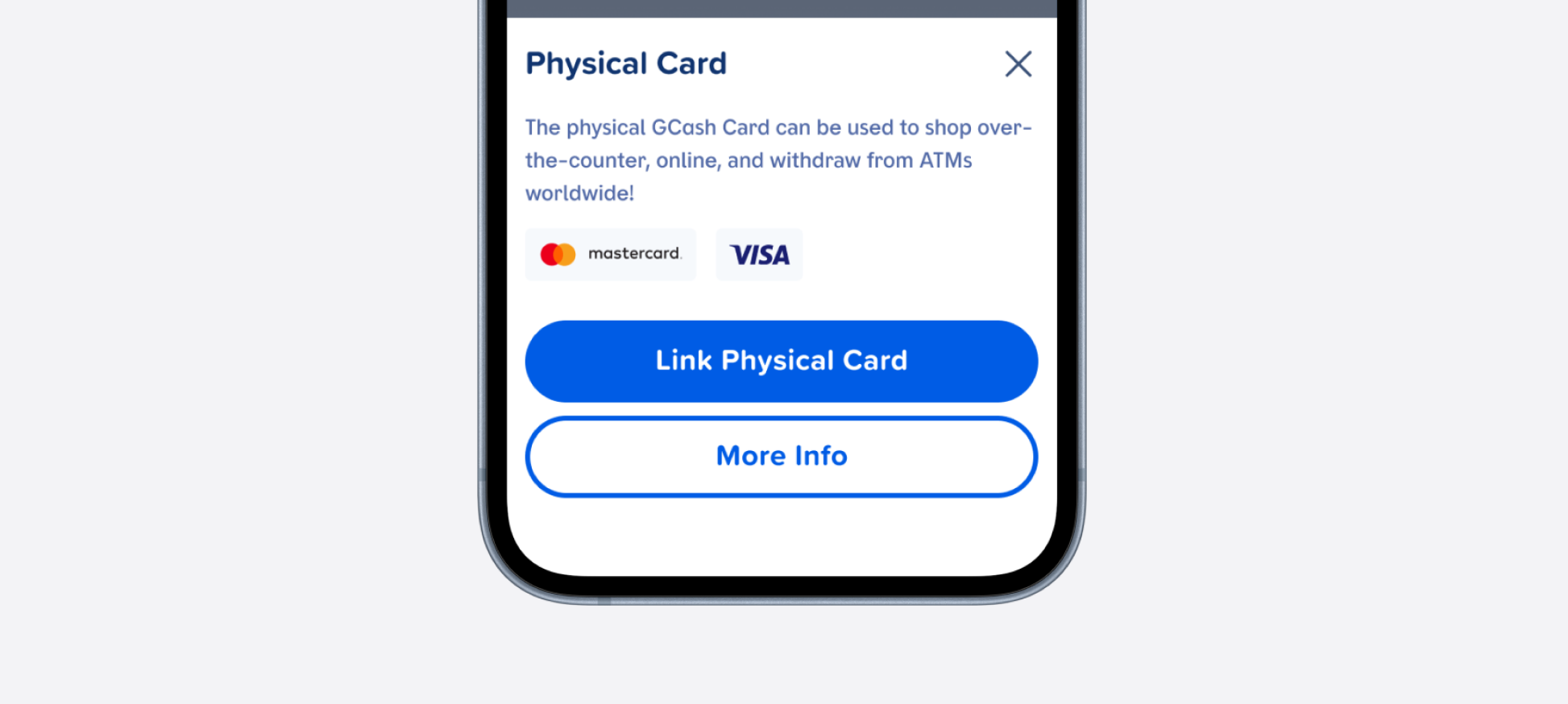
How the button appears in real product screens — Link Physical Card and More Info on a card sheet, Add a Card under the card options, Select this amount on GLoan, and Pay Loan on a due-date card.
Leading Container and Trailing Container SLOT nodes in every variant.Property=Value naming across all 60 variants. Size, State, and Style are orthogonal variant dimensions. Appearance is a variable mode — no naming conflicts. 12 color variables bound consistently.Button, Style=Outline → OutlinedButton, Style=Text → TextButton. SLOT nodes support icon+label compositions. Each size has its own text style — clean native mapping.| State | iOS | Android | Figma Property | Notes |
|---|---|---|---|---|
| Default | Yes | Yes | State=Default | All four appearance modes fully defined. |
| Pressed | Yes | Yes | State=Pressed | Darker fill/border using pressed tokens. |
| Disabled | Yes | Yes | State=Disabled | Muted color tokens applied across all appearances. |
| Destructive | Yes | Yes | Appearance mode: Destructive | Red tokens via variable mode. Applies to all 3 styles (Filled/Outline/Text). |
| Focused (a11y) | N/A | N/A | — | Mobile-only component. Focus rings rendered natively by iOS (UIKit/SwiftUI) and Android (Material a11y). No Figma state required. |
| Loading | Yes | Yes | Native modifier | Handled as an interaction modifier in native code — .ebLoading(true) (SwiftUI) / isLoading = true (Compose). Removed as a Figma state in v4.0. |
| Icon Only (a11y) | Yes | Yes | Icon Placement=Icon Only | Square target matches size height. Requires accessibilityLabel / contentDescription since no visible text. |
- Layer renamed from
.base/button/small→containeron compact disabled container (C1) - Icon slots (
Leading Container,Trailing Container) added to all variants as Figma SLOT nodes (C2) -
isErrorreplaced — Destructive is now an appearance variable mode, not a variant property (C2) - v2: Outlined and Text Link moved from appearance to
Stylevariant property (Filled/Outline/Text) (C2) - v2: Size moved from variable modes to variant dimension — each size has its own text style, eliminating font-size variable conflict (C2/C3)
- v3:
Buttonvariable collection created with 4 appearance modes (Default/Destructive/White/Subtle) — 12 color variables bound to all 60 variants (C3) - v3: Old
Button Sizeandbutton/variantcollections removed (C3) - v3.1: Loading state added — 12 new
State=Loadingvariants with dot indicators replacing label, disabled appearance colors (C5) - v4.0: Icon Placement promoted to component property — replaces
leadingIcon/trailingIconbooleans with a single 4-value enum (None/Leading/Trailing/Icon Only). AddsIcon Onlysquare variant for toolbars/navigation (previously a design recommendation). Handoff is now explicit — developers see icon placement as a first-class property. (C2) - v4.0: Appearance Mode documented in Figma component description with SwiftUI/Compose API mapping — addresses the Mode-invisibility handoff gap until Code Connect is implemented. (C7 partial)
- v4.0: State simplified to Default/Pressed/Disabled — Loading moved to a native interaction modifier rather than a Figma variant. (C5)
- v4.1:
button-containerwrapper layer removed — outermost component now holds fill/radius/auto-layout directly. Layer depth reduced from 4 to 3 (component → container → label/icon). Innercontainerretained for icon-label gap grouping. (C1) - v4.1: Large height reduced from 56px → 50px per design review feedback. (C3)
- v4.1: New Mode-driven token collection applied — all 60 Filled variants bound to
appearance/container/fill(+ pressed/disabled), all 60 Outline variants bound toappearance/stroke/color+ newappearance/label/on-surface/color, all 60 Text variants bound toappearance/label/on-surface/color. Switching the parent frame's Variable Mode (Default / Destructive / White / Subtle) now drives appearance across all 180 variants. (C3) - v4.1: New
appearance/label/on-surface/colorvariable created — semantic separation between labels on filled vs surface backgrounds. Eliminates token-purpose confusion between Filled labels (white-on-fill) and Outline/Text labels (color-on-surface). (C3) - v4.1: Text styles renamed to cleaner
Primary/Label/Large,Primary/Label/Base,Primary/Label/Small,Primary/Label/Fine(wasPrimary/Label/Light/*family). (C3)
- Document full-width (stretch) behavior. Add an
isFullWidthboolean property for bottom-sheet CTAs and standalone action areas. Today this is achieved via constraints on each screen; a first-class property makes the intent explicit and removes per-screen guesswork. Property
Component Playground
Layout
VStack
Typography
Colors
iOS — Swift Package Manager
.package(url: "https://github.com/AY-Org/eb-ds-ios", from: "1.0.0")
Android — Gradle (Kotlin DSL)
implementation("com.eastblue.ds:button:1.0.0")
Import
import EastBlueDS
import com.eastblue.ds.button.*
Package not yet published. These are the planned distribution paths. API shape is final — native implementation is pending.
Every row maps a Figma component property to its native equivalent. When a developer selects a variant in Figma, Code Connect will output the corresponding native code using these mappings.
| Figma Property | SwiftUI | Compose |
|---|---|---|
Style=Filled | .ebAppearance(.filled) | EBButton {} |
Style=Outline | .ebAppearance(.outlined) | EBOutlinedButton {} |
Style=Text | .ebAppearance(.textLink) | EBTextButton {} |
Appearance=Default | (default — omit modifier) | (default — omit colors param) |
Appearance=Destructive | .ebColorScheme(.destructive) | colors = EBButtonDefaults.destructiveColors() |
Appearance=White | .ebColorScheme(.white) | colors = EBButtonDefaults.whiteColors() |
Appearance=Subtle | .ebColorScheme(.subtle) | colors = EBButtonDefaults.subtleColors() |
Size=Large…XSmall | controlSize: .large / .regular / .small / .compact / .mini | size = EBButtonSize.Large / Medium / Small / Compact / XSmall |
State=Disabled | .disabled(true) | enabled = false |
(Loading — runtime) | .ebLoading(true) | isLoading = true |
Icon Placement=None | (default — text only) | (default — text only) |
Icon Placement=Leading | Label("…", systemImage: "…") | leadingIcon = { Icon(…) } |
Icon Placement=Trailing | Label + trailing Image | trailingIcon = { Icon(…) } |
Icon Placement=Icon Only | EBButton(icon: Image(…), accessibilityLabel: "…") | EBButton(contentDescription = "…") { Icon(…) } |
// Default appearance — Mode resolves at parent (.environment(\.ebAppearance, .default))
EBButton("Save Changes")
    .ebAppearance(.filled)
    .controlSize(.large)

// Destructive appearance
EBButton("Delete Account")
    .ebAppearance(.filled)
    .ebColorScheme(.destructive)

// Icon Placement = Leading
EBButton("Send Money", leadingIcon: Image(systemName: "arrow.up.right"))
    .ebAppearance(.filled)

// Icon Placement = Trailing
EBButton("Continue", trailingIcon: Image(systemName: "chevron.right"))
    .ebAppearance(.filled)

// Icon Placement = Icon Only — square target, accessibility label required
EBButton(icon: Image(systemName: "plus"), accessibilityLabel: "Add item")
    .ebAppearance(.filled)

// Disabled
EBButton("Submit")
    .ebAppearance(.filled)
    .disabled(true)

// Loading — runtime only, not a Figma state
EBButton("Submit")
    .ebAppearance(.filled)
    .ebLoading(true)
// Default appearance — Mode resolves at theme/parent
EBButton(
    onClick = { /* action */ },
    size = EBButtonSize.Large
) {
    Text("Save Changes")
}

// Destructive appearance
EBButton(
    onClick = { /* action */ },
    colors = EBButtonDefaults.destructiveColors()
) {
    Text("Delete Account")
}

// Icon Placement = Leading
EBButton(
    onClick = { },
    leadingIcon = { Icon(Icons.Default.Send, contentDescription = null) }
) {
    Text("Send Money")
}

// Icon Placement = Trailing
EBButton(
    onClick = { },
    trailingIcon = { Icon(Icons.Default.ChevronRight, contentDescription = null) }
) {
    Text("Continue")
}

// Icon Placement = Icon Only — contentDescription required
EBButton(
    onClick = { },
    contentDescription = "Add item"
) {
    Icon(Icons.Default.Add, contentDescription = null)
}

// Disabled
EBButton(
    onClick = { },
    enabled = false
) {
    Text("Submit")
}

// Loading — runtime only, not a Figma state
EBButton(
    onClick = { },
    isLoading = true
) {
    Text("Submit")
}
// Default
EBButton("Cancel")
    .ebAppearance(.outlined)

// Destructive
EBButton("Remove Item")
    .ebAppearance(.outlined)
    .ebColorScheme(.destructive)

// Icon Placement = Leading
EBButton("Filter", leadingIcon: Image(systemName: "line.3.horizontal.decrease"))
    .ebAppearance(.outlined)

// Icon Placement = Icon Only
EBButton(icon: Image(systemName: "square.and.arrow.up"), accessibilityLabel: "Share")
    .ebAppearance(.outlined)

// Button pair
HStack(spacing: 12) {
    EBButton("Cancel").ebAppearance(.outlined)
    EBButton("Save").ebAppearance(.filled)
}
EBOutlinedButton(
    onClick = { /* action */ }
) {
    Text("Cancel")
}

// Icon Placement = Leading
EBOutlinedButton(
    onClick = { },
    leadingIcon = { Icon(Icons.Default.FilterList, contentDescription = null) }
) {
    Text("Filter")
}

// Icon Placement = Icon Only
EBOutlinedButton(
    onClick = { },
    contentDescription = "Share"
) {
    Icon(Icons.Default.Share, contentDescription = null)
}

// Button pair
Row(horizontalArrangement = Arrangement.spacedBy(12.dp)) {
    EBOutlinedButton(onClick = {}) { Text("Cancel") }
    EBButton(onClick = {}) { Text("Save") }
}
EBButton("Learn More")
    .ebAppearance(.textLink)
    .controlSize(.small)

// Destructive
EBButton("Remove")
    .ebAppearance(.textLink)
    .ebColorScheme(.destructive)

// Icon Placement = Trailing (common for inline links)
EBButton("Read more", trailingIcon: Image(systemName: "chevron.right"))
    .ebAppearance(.textLink)
EBTextButton(
    onClick = { /* action */ },
    size = EBButtonSize.Small
) {
    Text("Learn More")
}

// Icon Placement = Trailing (common for inline links)
EBTextButton(
    onClick = { },
    trailingIcon = { Icon(Icons.Default.ChevronRight, contentDescription = null) }
) {
    Text("Read more")
}
| Requirement | iOS | Android |
|---|---|---|
| Min touch target | 44 × 44pt | 48 × 48dp |
| Focus ring | Handled by UIKit/SwiftUI | Handled by Material ripple |
| Icon-only buttons | .accessibilityLabel("Send") | contentDescription = "Send" |
| Destructive role | role: .destructive — announced by VoiceOver | Use semantics { role = Role.Button } |
| Loading state | .accessibilityLabel("Loading") + disable tap | semantics { stateDescription = "Loading" } + disable click |
Do
Use one Filled button per screen area as the primary action. Pair with Outline or Text for secondary.
Don't
Place two filled buttons side by side — they compete for attention and neither reads as primary.
Do
Use Destructive appearance for irreversible actions (delete, remove). Always pair with a confirmation.
Don't
Use Destructive for actions that are simply "negative" but reversible (dismiss, close, decline).
Do
Use White appearance on brand-colored or dark surfaces (hero banners, promotional cards).
Don't
Use White appearance on a white background — the button disappears. Use Default or Subtle instead.
Do
Use Text style for inline or low-emphasis actions (Learn more, View terms, Skip).
Don't
Use Text style for primary form submission — it lacks the visual weight to signal the main action.
| ID | Criterion | Status | Notes |
|---|---|---|---|
| C1 | Layer Structure & Naming | Ready | All layers use semantic names. container, #label, leadingIcon, trailingIcon consistent across all 60 variants. |
| C2 | Variant & Property Naming | Ready | v3 clean orthogonal dimensions: Style (Filled/Outline/Text), Size (Large/Medium/Small/Compact/XSmall), State (Default/Pressed/Disabled). Appearance via 4 variable modes. leadingIcon/trailingIcon are SLOT nodes with Boolean component properties. |
| C3 | Token Coverage | Ready | All color values connected to semantic tokens. Layout/sizing driven by button/size variable collection (height, padding-h, padding-v, font-size). |
| C4 | Native Mappability | Ready | Maps to Button, OutlinedButton, TextButton. Destructive maps to role: .destructive / contentColor = errorColor. |
| C5 | Interaction State Coverage | Ready | Default, Pressed, Disabled, Loading covered across all 60 variants. Focus ring is N/A — mobile OS handles natively. Loading uses dot indicators with disabled appearance colors. |
| C6 | Asset & Icon Quality | Ready | Icon slots are Figma SLOT nodes accepting vector icon instances. Boolean properties control visibility. |
3 Style × 5 Size × 3 State × 4 Icon Placement = 180 variants. Appearance is a variable mode (Default/Destructive/White/Subtle) that further multiplies visual states × 4 = 720 resolved visual states.
| Style | Sizes | States | Icon Placements | Count |
|---|---|---|---|---|
| Filled | Large, Medium, Small, Compact, XSmall | Default, Pressed, Disabled | None, Leading, Trailing, Icon Only | 60 |
| Outline | Large, Medium, Small, Compact, XSmall | Default, Pressed, Disabled | None, Leading, Trailing, Icon Only | 60 |
| Text | Large, Medium, Small, Compact, XSmall | Default, Pressed, Disabled | None, Leading, Trailing, Icon Only | 60 |
appearance/container/fill (and pressed/disabled), Outline borders bound to appearance/stroke/color, all Outline + Text labels bound to new appearance/label/on-surface/color. Switching the parent frame's Variable Mode now drives appearance across the entire variant set. Validates the Mode → Property → API translation pattern for upcoming Code Connect work. Appliedappearance/label/on-surface/color variable created — 3 variants (color, color-pressed, color-disabled) × 4 modes. Provides semantic separation: label/color = labels on filled backgrounds (white-on-fill), label/on-surface/color = labels on transparent/surface backgrounds (color-on-surface). Eliminates the binding ambiguity for Outline/Text styles. Addedbutton-container wrapper layer removed — Visual properties (fill, radius, auto-layout, padding) lifted from inner button-container frame up to the variant component itself. Layer depth: 4 → 3. Native parity improved (the component IS the styled element, matching SwiftUI/Compose conventions). Inner container frame retained for icon-label gap grouping. RestructuredPrimary/Label/Large (was Primary/Label/Light/Base), Primary/Label/Base, Primary/Label/Small, Primary/Label/Fine. Cleaner semantic naming, removes the redundant "Light" prefix. RenamedleadingIcon, trailingIcon) caused handoff ambiguity. Now a single 4-value enum: None / Leading / Trailing / Icon Only. Adds Icon Only as a new square-button variant. Total variants: 60 → 180 (3 Styles × 3 States × 5 Sizes × 4 Icon Placements). RestructuredState now Default/Pressed/Disabled. Loading is handled as an interaction modifier in native code rather than a Figma variant. SimplifiedState=Loading variants (3 Styles × 4 Sizes). Dot indicators (● ● ●) replace label text. Uses disabled appearance colors. Tap is disabled during loading. AddedisError replaced with Variant: Brand | Destructive — True orthogonal property applied to all 24 variants. Destructive Default (filled) variants added for all 3 states. All 30 existing variants renamed. Fixedbutton/size variable collection with 4 modes: Large (52px), Medium (36px), Small (28px), XSmall (24px). Reduces variant count from 36 → 24 while expanding size coverage. Restructuredbutton/size variable collection created — 5 variables (height, font-size, padding-h, padding-v, icon-size) bound to all containers, labels, and icon slots across all variants. Fixed height binding prevents icon slot size from affecting button height. AddedleadingIcon and trailingIcon promoted from hidden frames to Figma SLOT nodes. Boolean component properties added for designer toggle control. UpgradedisError is not a true orthogonal boolean. Only applies to Outlined and Text Link, not Default. Recommendation: fold into Appearance as Outlined Error / Text Link Error. Resolved in v2.0.0. Resolved in 2.0.0leadingIcon + trailingIcon — Added to all 30 variants. Hidden by default. Upgraded to SLOT nodes with Boolean properties in v2.0.0. Fixed.base/button/small → container — Resolves C1. Fixed