A trigger field that opens a menu of options — composes Select Field for the trigger and Select Group for the menu.
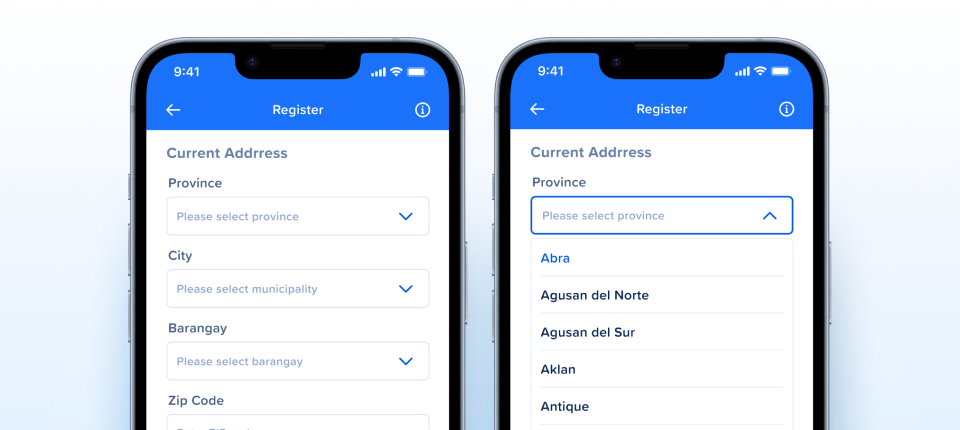
How the select appears in real product screens — Province, City and Barangay selects on a Register address form, closed with placeholders and open on Province to show the list of provinces.
Type = Default | PesoSignVector | PesoSignText after this pass, matching the same two currency values on Select Item. State and isFilled were settled in v2.1 and still hold.| State | iOS | Android | Figma Property | Notes |
|---|---|---|---|---|
| State=Default | N/A | N/A | border #D7E0EF | Collapsed. Chevron points down; the menu instance is present but hidden. |
| State=Expanded | N/A | N/A | border #005CE5 | The menu appears below the trigger and the chevron flips to Chevron Up. The trigger's own box stays 46 tall — the menu overlays what is beneath it. |
| State=Error | N/A | N/A | border #D61B2C | Border only. The error message itself belongs to the form, not to this control. |
| State=Disabled | N/A | N/A | #F6F9FD fill | The only state that changes the fill as well as the border. |
| isFilled | N/A | N/A | value vs placeholder | Switches the trigger between the #90A8D0 placeholder and a chosen value in #0A2757. The copy follows the Type: Default runs "Select Option" → "Selected Option", both currency Types run "Select Value" → 1,000.00. There is no floating label — the #label layer ships hidden in all 24 versions. |
| No pressed state | N/A | N/A | by design | A form field signals interaction by expanding, not by tinting. Confirmed correct in the previous assessment and unchanged. |
- The drawn peso sign is an unflattened boolean shape. The
PesoSignVectorartwork is aBOOLEAN_OPERATION, not a flattened vector — the right shape in the wrong wrapper, which exports less predictably than the rest of the icon set. One for the iconography team. The mark lives inside Select Field, so fixing it there fixes it everywhere it appears. C6 · Asset & Icon Quality
- The copy rule holds across all three Types. Default asks for an option and fills with
Selected Option; both currency Types ask for a value and fill with1,000.00. The fourType=Default, isFilled=truevariants read "Selected Value" until this pass — the plain version filling with the currency version’s word. All four were corrected in Figma while the review was open, so the split is now consistent in the file and on the page. C1 · Layer Structure & Naming - The peso sign dims with the field now. It used to keep
text/color-text#0A2757 inState=Disabledwhile the placeholder and the chevron faded around it, so the field read as half switched-off. Both marks were corrected in Figma during this pass and now taketext/color-text-disabled#C2CFE5 — the drawnPesoSignVectorand thePesoSignTextglyph alike. Enabled is unchanged at #0A2757. C5 · Interaction State Coverage - Two undocumented rebuilds are now on the record. The v2.0 rebuild added
State=Disabled, dropped a product-specific Mobile variant and moved to composing Select Field and Select Group. v2.1 renamedState=ActivetoExpanded, alignedisFilledtotrue/falseso it agreed with the field it wraps, and removed a redundantisSelected. Both were described in the component's verdict but neither reached the changelog, so the history stopped at the initial assessment. This version covers them. C2 · Variant & Property Naming - A third Type joined, deliberately. The matrix was
Type(2) ×State(4) ×isFilled(2) = 16. It is now 24, because currency needed two treatments rather than one:PesoSignVectoris a custom SVG drawn to match the font,PesoSignTextis Proxima's own ₱ glyph. They render almost identically at this size, which is exactly why the distinction has to be documented rather than left to the eye. C2 · Variant & Property Naming - The multi-word values are joined.
PesoandText - Peso SignbecamePesoSignVectorandPesoSignText— spaces and the hyphen separator gone, renamed for what they are rather than how they were first described, and matched to the same values on Select Item so the two components agree. C2 · Variant & Property Naming - The placeholder copy agrees across states.
State=Expanded, isFilled=falseread "Value" whileState=Default, isFilled=falseread "Select Option" — the same unfilled control saying two different things depending on whether it was open. Both now read "Select Option". C1 · Layer Structure & Naming - The menu's leftovers were cleaned up in Select Group. Every one of the 24 variants embeds a Select Group instance, so the five stale hidden rows and the vestigial
Dropdown Item - Lastname were shipping 24 times over. Both were fixed at the source — see Select Group. C1 · Layer Structure & Naming - The menu instance rides along in all 24 variants. It is present whether or not
State=Expanded, hidden in the 20 collapsed ones. That is how a Figma variant carries an overlay it cannot conditionally instantiate, and it is why the trigger's box stays 46 tall while the menu overflows below it. Natively the menu is presented, not embedded. C4 · Native Mappability - The leading mark's right padding is uniform at 8. The two currency types had different right padding on their
peso-signframe, so the label started at a slightly different place depending on which one was chosen. Both are now 8, and the frames sit flush againsttext-container— the frame widths still differ, 23 against 18, but only because the custom SVG glyph is wider than Proxima's. The layer belongs to Select Field rather than to Select, but the change is confined to the variants where a currency mark is visible, so nothing that does not show one moves. C1 · Layer Structure & Naming - No pressed state, still correct. Form fields signal interaction by expanding rather than by tinting, so Pressed would be a state with nothing to show. Confirmed in the previous assessment and unchanged here. C5 · Interaction State Coverage
- Select Field is out of scope, and that needs saying out loud. The trigger is a Select Field instance, and that component also backs text fields and other visually similar inputs — changing it to suit Select would move things that have nothing to do with Select. So it was deliberately excluded from this review. A developer reading this page will reasonably ask why the trigger is not documented alongside the menu, and the answer is blast radius rather than oversight. Its internals do carry lowercase and kebab-case layer names, and a hidden
philippinesrectangle that this pass confirmed is a raster image fill rather than a vector flag — all of it waiting on that component being assessed on its own terms. Docs - Document when to use PesoSignVector versus PesoSignText. One is a custom SVG matched to the font, the other is Proxima's native ₱. At 16px they are nearly indistinguishable, so a designer picking from the variant menu has nothing to go on. A sentence on the component turns a coin-flip into a decision. Docs
- Specify how the menu is presented natively. In Figma the menu is an embedded instance that overflows the trigger's box. On both platforms it is a presented surface — a popup or a sheet — with its own dismissal, its own scroll and its own placement rules when there is no room below. None of that is visible in the component, so it belongs in the native contract. Docs
- Specify the accessible combobox contract. A Select needs a role, an expanded state, a link between the trigger and the list it controls, and the chosen value announced on change. The error state also needs its message associated with the field rather than merely rendered near it — the red border alone reaches no one using a screen reader. A11y
- See siblings: Select Group is the menu this opens and Select Item is the row inside it — both reassessed alongside this component. Select Field is the trigger, out of scope. Family
- Settle the placeholder wording across the three Types. v2.0.1: Applied — the wording is deliberate and now written down.
Type=Defaultasks for an option and fills withSelected Option. Both currency Types ask for a value and fill with an amount,1,000.00. The previews and the code samples use exactly that copy, so a designer picking a version is not left guessing whether "Select Value" was a typo. Docs - Publish the token names once Dev Mode is read. v2.0.1: Applied — every colour on the page is now named. The field is
bg/color-bg-main, orbg/color-bgwhen disabled. The border runsborder/color-border,-primary,-errorand-weakacross the four states, at 1px, 2px, 2px and 1px. The value istext/color-text-weakestas a placeholder,text/color-textonce chosen andtext/color-text-disabledwhen switched off, and the chevron isborder/color-border-primaryand-primary-disabled. Read against the rest of the system rather than from Dev Mode, which still returns IDs instead of names. Token
Component Playground
Layout
VStack
Typography
Colors
iOS — Swift Package Manager
.package(url: "https://github.com/AY-Org/eb-ds-ios", from: "1.0.0")
Android — Gradle (Kotlin DSL)
implementation("com.eastblue.ds:select:1.0.0")
Import
import EastBlueDS
import com.eastblue.ds.select.*
Three variant properties and the menu’s slot. Type is the only one that becomes a parameter: State is presentation and platform idiom rather than API — a caller cannot put a field into Expanded, only open it — and isFilled is derived from whether a selection exists, which is why neither is passed in. The property panel lists one nested instance, Select Group, and no slot of its own — natively the rows arrive through the trailing closure, matching Select Group. Two things the trigger owns are deliberately absent: the placeholder and the floating label are text layers inside Select Field, a component this review does not cover because it also backs text fields.
| Figma Property | SwiftUI | Compose |
|---|---|---|
| Type — Default, PesoSignVector, PesoSignText | type: EBSelectType = .default | type: EBSelectType = Default |
| State — Default, Expanded, Error, Disabled | not a parameter — Expanded is the menu’s own presentation, Error is errorMessage: String?, Disabled is .disabled(true) | not a parameter — Error is isError = true with supportingText, Disabled is enabled = false |
| isFilled — true, false | derived — selection != nil | derived — selection != null |
| Select Group (nested instance) | @ViewBuilder content: () -> Content | content: @Composable ColumnScope.() -> Unit |
EBSelect(
    label: "Account",
    placeholder: "Select Option",
    type: .default
) {
    EBSelectItem(label: "Savings account")
    EBSelectItem(label: "Checking account")
}
EBSelect(
    label = "Account",
    placeholder = "Select Option",
    type = EBSelectType.Default
) {
    EBSelectItem(label = "Savings account")
    EBSelectItem(label = "Checking account")
}EBSelect( label: "Amount", placeholder: "Select Value", type: .pesoSignVector ) { EBSelectItem(label: "₱500") EBSelectItem(label: "₱1,000") }
EBSelect(
    label = "Amount",
    placeholder = "Select Value",
    type = EBSelectType.PesoSignVector
) {
    EBSelectItem(label = "₱500")
    EBSelectItem(label = "₱1,000")
}EBSelect( label: "Amount", placeholder: "Select Value", type: .pesoSignText, errorMessage: "Choose an amount to continue" ) { EBSelectItem(label: "₱500") EBSelectItem(label: "₱1,000") }
EBSelect(
    label = "Amount",
    placeholder = "Select Value",
    type = EBSelectType.PesoSignText,
    isError = true,
    supportingText = "Choose an amount to continue"
) {
    EBSelectItem(label = "₱500")
    EBSelectItem(label = "₱1,000")
}| Requirement | iOS | Android |
|---|---|---|
| Exposed as a combobox | Button trait plus .accessibilityValue carrying the chosen option | Modifier.semantics { role = Role.DropdownList } |
| Expanded state is announced | .accessibilityAddTraits(.isExpanded) while the menu is open | expand and collapse actions on the trigger |
| Error message is associated, not just adjacent | Message folded into the field's accessibility value | supportingText tied to the field, isError = true |
| Selection announced on change | The chosen option is announced when the menu closes | Same — the trigger's value updates and is announced |
| Menu dismissable without choosing | Escape gesture closes and returns focus to the trigger | Back press closes and returns focus to the trigger |
Do
Use Select when the value comes from a fixed, known list.
Don't
Don't use it for free text or for a list long enough to need searching.
Do
Leave room below the trigger for the menu to open.
Don't
Don't assume the menu fits inside the trigger's 46px box — it overlays what is beneath it.
Do
Pair Error with a message the form owns.
Don't
Don't rely on the red border alone — it reaches nobody using a screen reader.
Do
Pick the currency Type deliberately and document which one.
Don't
Don't mix PesoSignVector and PesoSignText across one form; they differ subtly enough to look like a mistake.
| ID | Criterion | Status | Notes |
|---|---|---|---|
| C1 | Layer Structure & Naming | Ready | Two composed instances and nothing drawn locally. The placeholder copy agrees across states, the menu’s own leftovers were cleaned up at the source, and the filled copy now follows the Type — Selected Option for Default, 1,000.00 for the two currency Types. |
| C2 | Variant & Property Naming | Ready | Three properties, all read off the variant names: Type = Default | PesoSignVector | PesoSignText — the same set Select Item uses minus Icon and Flag — plus State and isFilled. The native type is EBSelectType; the page previously called it EBSelectLeading, a name no Figma property matches. |
| C3 | Token Coverage | Ready | Every colour is named. bg/color-bg-main on the field and bg/color-bg when disabled; border/color-border, -primary, -error and -weak across the four states, at 1px, 2px, 2px and 1px; text/color-text-weakest for the placeholder, text/color-text when filled, text/color-text-disabled when disabled; border/color-border-primary and -primary-disabled on the chevron. Both text layers resolve to Primary/Label/Light/*. |
| C4 | Native Mappability | Ready | A trigger plus a presented menu. The embedded-instance-in-every-variant arrangement is a Figma necessity, documented rather than mistaken for the native shape. |
| C5 | Interaction State Coverage | Ready | Four states across both fill values, and the absence of Pressed is correct for a form field. The one gap this pass found — the currency mark holding #0A2757 in Disabled — was fixed in Figma while the review was open; both marks now take text/color-text-disabled. |
| C6 | Asset & Icon Quality | Needs Refinement | No artwork of its own — the chevron is a 32 × 32 instance with a 2px stroke and the currency marks a 15-wide drawing and a 10-wide glyph, all owned by Select Field; the rows belong to Select Item. Worth recording where it is drawn: the PesoSignVector artwork is a BOOLEAN_OPERATION rather than a flattened vector. |
3 Type × 4 State × 2 isFilled = 24 variants — a complete matrix, no correlated axes.
| Type | Leading mark | Covers | Count |
|---|---|---|---|
| Default | — | 4 State × 2 isFilled | 8 |
| PesoSignVector | 15 wide, drawn | 4 State × 2 isFilled | 8 |
| PesoSignText | 10 wide, glyph | 4 State × 2 isFilled | 8 |
View full Type × State × isFilled breakdown (24 rows)
| Type | State | isFilled | Menu | Node |
|---|---|---|---|---|
| Default | Default | false | hidden | 7947:111932 |
| Default | Default | true | hidden | 7947:111935 |
| Default | Expanded | false | shown | 7947:111866 |
| Default | Expanded | true | shown | 7947:111869 |
| Default | Error | false | hidden | 7947:111944 |
| Default | Error | true | hidden | 7947:111947 |
| Default | Disabled | false | hidden | 7947:111956 |
| Default | Disabled | true | hidden | 7947:111959 |
| PesoSignVector | Default | false | hidden | 7947:111938 |
| PesoSignVector | Default | true | hidden | 7947:111941 |
| PesoSignVector | Expanded | false | shown | 7947:111872 |
| PesoSignVector | Expanded | true | shown | 7947:111902 |
| PesoSignVector | Error | false | hidden | 7947:111950 |
| PesoSignVector | Error | true | hidden | 7947:111953 |
| PesoSignVector | Disabled | false | hidden | 7947:111962 |
| PesoSignVector | Disabled | true | hidden | 7947:111965 |
| PesoSignText | Default | false | hidden | 7947:115144 |
| PesoSignText | Default | true | hidden | 7947:115386 |
| PesoSignText | Expanded | false | shown | 7947:115147 |
| PesoSignText | Expanded | true | shown | 7947:115389 |
| PesoSignText | Error | false | hidden | 7947:115150 |
| PesoSignText | Error | true | hidden | 7947:115392 |
| PesoSignText | Disabled | false | hidden | 7947:115153 |
| PesoSignText | Disabled | true | hidden | 7947:115395 |
text/color-text #0A2757 in State=Disabled while the placeholder and the chevron faded around it, so the field read as half switched-off. Both marks now take text/color-text-disabled #C2CFE5 — the drawn PesoSignVector and the PesoSignText glyph alike.Type=Default, isFilled=true variants read "Selected Value" — the plain version filling with the currency version’s word. They now read "Selected Option". The rule is one line: Default asks for an option and fills with one, both currency Types ask for a value and fill with 1,000.00.PesoSignVector draws a BOOLEAN_OPERATION rather than a flattened vector — the right shape in the wrong wrapper. Logged for the iconography team rather than fixed here; it lives inside Select Field, so one fix covers everywhere it appears.Type is the driving property, so Default, PesoSignVector and PesoSignText each get a card. State and isFilled stay controls — three cards describing 24 versions instead of one card describing none of them in particular.W Fill (366) · H 46 · gap 0 · padding 12 / 6 · left, centre. The old rows carried nine ad-hoc keys including a derived Padding V: 0 that was 6, and a bare 366 where the panel says Fill. The four sections are in guide order now — Properties, Colors, Typography, Layout.bg/color-bg-main, or bg/color-bg when disabled; the border runs border/color-border, -primary, -error and -weak across the four states at 1px, 2px, 2px and 1px — not the uniform weight the page implied. The page previously said "names pending Dev Mode read".#value is Primary/Label/Light/Small and the hidden #label is Primary/Label/Light/Base, replacing three font specs. The ₱ glyph resolves to the same style as the label..eb-preview-sel declared font-family: inherit, which resolves to BarkAda. Every text layer here is Primary/*, so the root names Proxima Soft. Caught by the typeface check rather than by eye.M9 13L16 20L23 13 at a 2px round-capped stroke, with the real Chevron Up path for Expanded rather than a rotated copy of the down one. Disabled reaches it through currentColor at border/color-border-primary-disabled #9BC5FD, where the page had the text disabled grey.EBSelectLeading and a leading: parameter mapped a property called Type. Both are now EBSelectType and type:, matching the property and matching Select Item, whose own pass made the same rename. Swift lowerCamels each case, Compose takes the Figma value verbatim.gcash/east-blue-ios and com.gcash.eastblue:components:1.0.0, with no Import line. It now cites the Select family artifact com.eastblue.ds:select:1.0.0 and imports com.eastblue.ds.select.*, identical to its two siblings.State=Expanded form, mixing properties with nested instances. Four rows now, one per property, prose in the Figma cell. State is marked not a parameter and isFilled derived rather than given invented mappings — a caller cannot put a field into Expanded, only open it.Type value now, the same three the Style tab cards use.Type and all 24 in the collapsible, each with its node.getSnippet, so both language tabs were frozen on a static string. They now follow the controls: Error adds errorMessage, Compose Disabled adds enabled = false, Swift appends .disabled(true).isFilled behaviour row described a label floating above the value — #label ships hidden in all 24 versions. And the trigger’s philippines flag, flagged as "worth checking for a raster fill", is one: a hidden raster image, now recorded as confirmed rather than suspected.State=Disabled added, a product-specific Mobile variant dropped, and the component moved to composing Select Field and Select Group rather than drawing them.State=Active renamed Expanded, isFilled aligned to true/false so it agreed with the field it wraps, and a redundant isSelected removed.Type value added — currency needed two treatments, a custom SVG matched to the font and Proxima's own ₱ glyph. The matrix went from 16 variants to 24.Peso and Text - Peso Sign renamed to PesoSignVector and PesoSignText, matching the same values on Select Item.25783:1148 (Sticker Sheets v2) to 7947:111865 (2026 Working File), and navGroup changed from Dropdown to Select to match the component's name.selected=yes/no instead of true/false. Incompatible with Swift Bool and Kotlin Boolean for Code Connect mapping.
Openshape_full is a BOOLEAN_OPERATION, not a clean vector path. May render inconsistently on native platforms.
Open